Provider Costs
Description
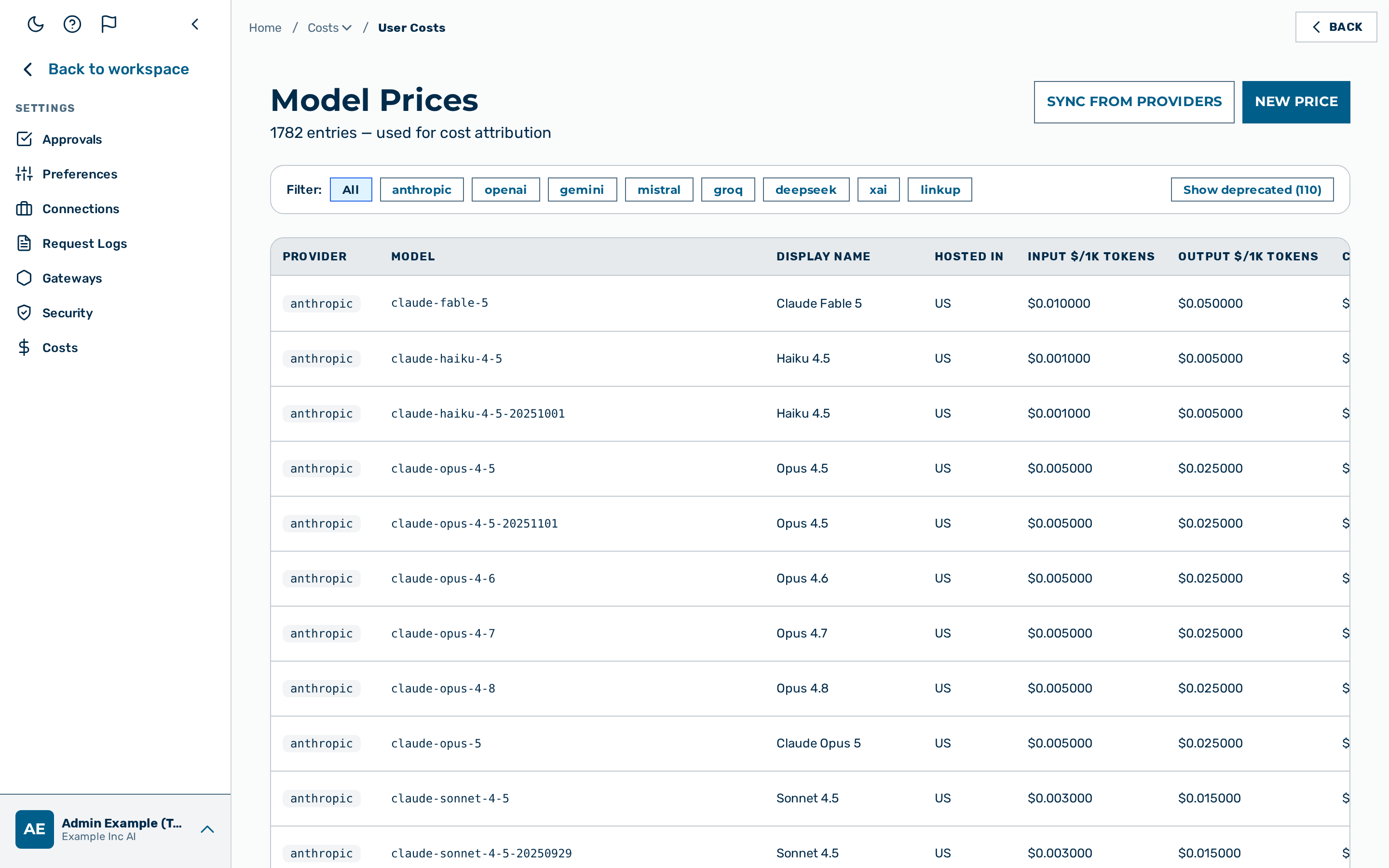
The Provider Costs view exposes the per-model pricing records used by the gateway for
cost attribution. It is the Provider Costs tab of Settings › Costs, reached from the
user-block menu at the bottom of the left sidebar → Settings → Costs (the route /model-prices is unchanged).
The view requires the platform admin role; an admin can mutate the prices or trigger a sync.
The page header shows the heading Provider Costs with the entry count. Two buttons sit at the top right:
- Sync from Providers — refreshes prices from the configured upstream sources (LiteLLM JSON and OpenRouter API).
- + New Price — opens the New Model Price dialog.
The filter row below the header filters the table by provider.
The table lists eight columns: Provider, Model, Display Name, Hosted in, Input ($/1K), Output ($/1K), Cache Read ($/1K), and Updated, plus an actions column. The Display Name is shown without the vendor prefix, keeping the tier and version — for example Sonnet 4.6 (see Models) — unless the row was entered manually. The two cache-write prices (Cache Write 5m and Cache Write 1h) are no longer shown as table columns but remain fully editable in the New/Edit price dialog — no pricing data is lost, only the table display is trimmed.
Provider pricing (external-model markup)
The Costs group has a separate admin-only Providers tab (route /provider-pricing), distinct from Provider Costs above. Where Provider Costs sets the raw per-model input/output prices, Provider Pricing governs the markup applied to external (non-Myra) models and surfaces unpriced self-hosted models. It requires the platform admin role.
- External-model markup. For each external model you can set a markup percentage (0–100 %) and a region tag — EU (default +10 %) or non-EU (default +20 %). Leaving the percentage blank falls back to the region default. The markup is applied to the charged cost of that model's real model-of-record legs; sidecar meter legs and Myra self-hosted models are never marked up. See Cost attribution for the exact formula.
- Unpriced self-hosted chat models. A Myra (self-hosted) chat model whose input or output price is unset or
≤ 0is shown as Unpriced — not served rather than$0.0000. Until it is priced (in Provider Costs), the gateway refuses to serve it — so a model is never billed at zero by mistake. (A transient failure to read the price is the one exception: it serves and logs a warning rather than block on a database blip.)
How model prices affect cost attribution
The gateway looks up model prices at log-write time for every inference response. If a model has no entry in this table, the gateway falls back to the built-in defaults where available. Requests to models with no matching price and no built-in fallback are logged with cost_usd = 0 and do not count against budgets — except a self-hosted (provider: myra) chat model with no usable price, which is refused up front rather than served free (see the reconcile note below).
See Cost Attribution for details on how token counts and prices combine to produce the final cost.
Model capabilities
Each model price record also carries capability metadata: whether the model supports function calling, parallel function calling, web search, vision, PDF input, prompt caching, reasoning, a response schema, and tool choice.
The capability metadata is populated by the Sync from Providers action from the upstream model catalogues. The capability metadata is not edited in the New Model Price dialog, which sets only the pricing fields. An absent capability value means the capability is unknown for that model.
💡 Note: The capability metadata informs the model catalogue and the model picker. Routing does not rely on the function-calling flag for the default model choice, because the upstream values are not reliable across all providers.
Adding a model price
Required role: platform admin.
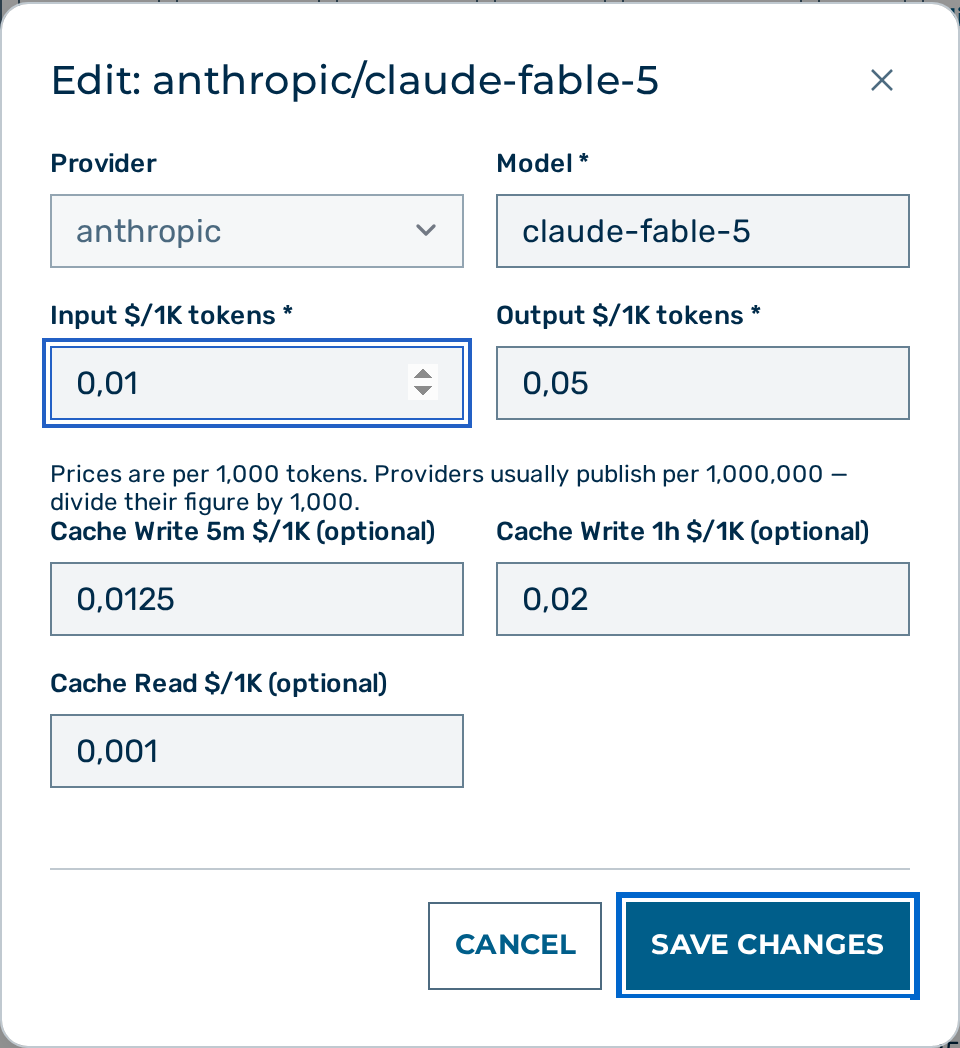
Proceed as follows to add a model price:
- Click on the + New Price button.
- The New Model Price dialog opens.
- Select the provider in the Provider drop-down list.
- Enter the exact model name in the Model text field. The name must match the value sent in inference requests.
- Enter the price in the Input $/1K tokens text field.
- Enter the price in the Output $/1K tokens text field.
- If the provider supports prompt caching, enter the prices in the Cache Write 5m $/1K, Cache Write 1h $/1K, and Cache Read $/1K text fields.
- Click on the Add Price button.
-> The new entry appears in the price table and is used for cost attribution on subsequent requests.
Valid model ids. The Model field must be a well-formed id — non-empty and with a non-empty final path segment. A structurally-malformed id (empty, or ending in a slash such as
fireworks_ai/accounts/fireworks/models/) is rejected with a400and never stored. The same rule applies to the upstream Sync (malformed ids are skipped, not imported) and it is enforced at the single write chokepoint, so such a row can never enter the catalog, appear in the model picker, be chosen as the Auto default, or be offered as a longer-context suggestion.
Editing a model price
Required role: platform admin.
Proceed as follows to edit a model price:
- Click the edit action icon on the model's row.
- The Edit:
/ dialog opens with the current values. - Update the price fields as required. The Provider and Model fields are read-only when editing.
- Click on the Save Changes button.
-> The updated prices are used for cost attribution on subsequent requests.
💡 Note: To correct a model name, delete the entry and add a new one.
Deleting a model price
Required role: platform admin.
⚠️ Caution: Deleting a model price causes the gateway to fall back to the built-in default for that model, or to log
cost_usd = 0if no built-in default exists.
Proceed as follows to delete a model price:
- Locate the row for the model.
- Click on the Delete button in the row.
- A confirmation dialog opens.
- Confirm the deletion.
-> The entry is removed from the price table.
Synchronising prices from upstream sources
Required role: platform admin.
Proceed as follows to synchronise prices:
- Click on the Sync from Providers button at the top right of the view.
- The button label changes to Syncing… until the sync completes.
-> A success banner reports the number of records inserted, updated, and skipped per provider. The new values are visible in the table immediately.
Myra-hosted models: how the fleet catalog reconciles
Myra-hosted models (provider: myra) reconcile against the fleet's own catalog every five
minutes, rather than against an upstream price list.
- A model the fleet starts serving is added automatically, at price
0.00 / 0.00. Its price is a deliberate internal figure and has to be set by hand. A self-hosted chat model left unpriced is now REFUSED to customers — the gateway returnsmodel_not_found(the same response as a deprecated model) at serve time, until a platform admin sets a real price. This is fail-closed: a self-hosted chat model is never servable at an implicit$0(previously it served free, unmetered). Non-chat fleet models (embeddings, reranking, image, speech) are priced at zero on purpose and are not gated — they keep serving. - A model the fleet stops serving is marked deprecated, not removed. It disappears from the model picker and from routing exactly as a removed model would, but the row — and with it the price, the context window, the display name and the region — is kept. A pod restart or a short maintenance window therefore cannot erase a price, and the model returns with its settings intact when the fleet serves it again.
- A deprecation the reconciler made is undone automatically when the model comes back. A deprecation you made stays in place: retiring a model from the catalogue by hand is a decision the fleet cannot overrule.
- Cost reports for past requests keep resolving, because a deprecated row is still priced.
To retire a Myra model permanently, deprecate it yourself once the fleet has stopped serving it.
⚠️ A zero price on a self-hosted chat model now blocks serving. A self-hosted (
provider: myra) chat model priced at0.00on either side is REFUSED to customers (model_not_found) rather than served unmetered — closing the old failure mode where a zero-priced chat model accrued nothing against any budget (caps, budget e-mails, thebudget_exceededwebhook and self-serve trial credit all silently saw$0). A platform admin must set a real internal price for it to become usable; the daily unpriced-chat-model alert still lists any that are left at zero. The fleet's embedding, reranking, image, speech-to-text and text-to-speech models are priced at zero on purpose — billed per a different unit — and are not gated: they keep serving, and are not part of that alert.
Editing a price
An edited price is accepted only when the input and output prices are both present and are
numbers of zero or more. A missing, non-numeric or negative price is rejected with a
400, and nothing is written — a negative price would otherwise disable metering for the model
entirely, the same way a zero price does. The three cache prices are optional; leaving them
blank clears them.
Token-limit provenance and authority
A model's token limits (max_input_tokens and max_output_tokens) can come from three sources, tracked per row in max_input_tokens_source:
provider— the provider's own model API (for example AnthropicGET /v1/models), which reflects the account's real tier and beta-header eligibility. This is authoritative.catalog— a self-hosted Myra pod's own configuration.litellm_json— the community LiteLLM snapshot. This is a hint that can lag the provider's real limits.
The gateway routes on a model's alias id (for example claude-opus-4-5). To keep routing decisions correct, a provider (or catalog) token limit is never overwritten by the LiteLLM hint, and each alias inherits the token limits of the newest provider snapshot for that model. Prices are unaffected by this rule and continue to sync from LiteLLM and OpenRouter as usual.
The gateway also self-corrects max_output_tokens at request time: when an upstream provider rejects a request with a 400 whose error text names the model's real output ceiling (Anthropic, OpenAI, and Cohere each phrase this differently), the gateway learns that ceiling so later requests to the same model clamp correctly without a full sync. Because the 400 body is untrusted input, this learning is guarded on two independent boundaries (fail-safe — learn nothing rather than accept a bad value):
- First-party endpoints only. The learned value is a global catalog update shared by every tenant, so it is accepted only from a Myra-resolved provider endpoint. It is ignored when the gateway routed to a tenant-controlled endpoint — any gateway that overrides the provider's host via
provider_base_urls,azure_endpoint, orhf_endpoint, or the Azure OpenAI provider (whose{azure_resource}.openai.azure.comhost is the tenant's own resource) — because such an endpoint could forge a400to poison the catalog for all tenants. - Plausible range only. The parsed ceiling is accepted only within
[256, 10000000]output tokens; a below-floor value (a catalog-wide throttle) or an absurd above-ceiling value is rejected. Context-window–shaped error bodies are not treated as output ceilings at all.
How the catalog limits are consumed at request time
Every request resolves its target model's identity once at the request boundary into a single record, and all downstream logic reads that record instead of re-deriving capabilities from the model-id string. The record draws from two authoritative sources, each the single source of truth for its fields:
- Token limits (
max_output_tokens,max_input_tokens) come from this catalog table. They drive the gateway'smax_tokensclamp: an over-large or context-overflowing request is trimmed to fit the model's real window rather than being rejected by the provider. - Behavioural capabilities — whether the model supports extended thinking, its thinking-shape, its native-compaction support, and its safe omitted-
max_tokensdefault — resolve from the per-model capability registry (keyed on the exact model id) as an override, falling back to provider-synced flags the daily importer writes into this table for first-party Anthropic models (supports_reasoning,uses_adaptive_thinking,supports_native_compaction, trusted only whencapability_source = 'provider'). The registry always wins where it speaks; the synced columns only fill a registry silence. See Capability sources & the trust stamp in the models API reference.
Because the identity is keyed on the exact model id (never a substring of it), two differently-capable models that merely share a common prefix can no longer be confused for one another.