User Costs
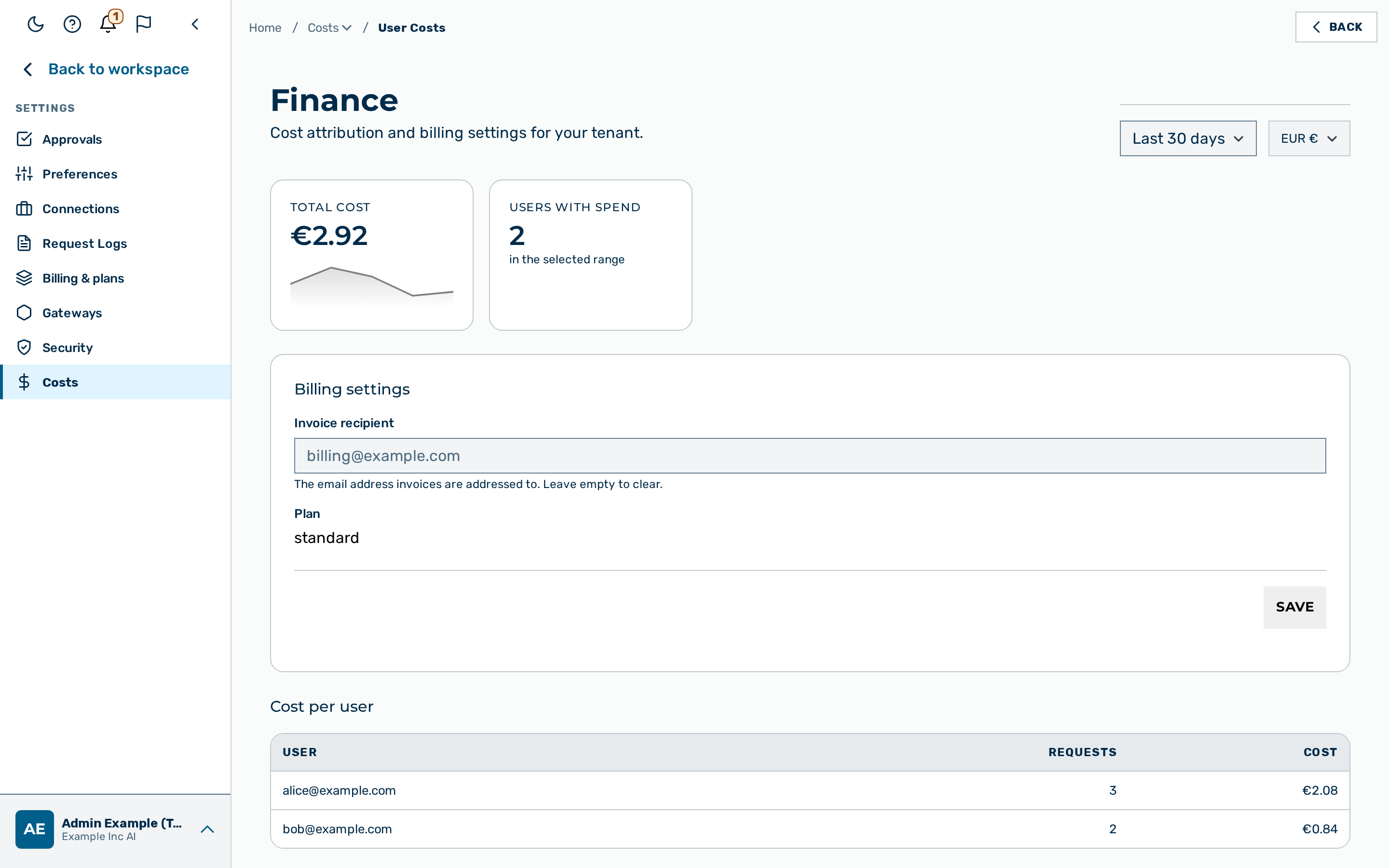
Description
The User Costs view reports the spend of every user in a tenant over a chosen time range. The
view is the User Costs tab of Settings → Costs, reached from the user-block menu at
the bottom of the left sidebar (route /finance). The User Costs tab reports spend per user;
the sibling Provider Costs tab reports pricing per model.
The view is available to the platform admin role, the tenant_admin role, and the scoped finance role. The finance role reads per-user cost and manages billing settings without the rest of the administrative surface. For the exact permissions of the role, see the Finance API.
The server enforces the tenant scope. A finance or tenant_admin caller sees the costs of the own tenant only. A caller without a tenant receives an error.
Summary cards
The view shows two summary cards above the table:
- The Total cost card shows the total spend across all users in the selected range, with a daily cost trend sparkline below the value.
- The Users with spend card shows the number of distinct users that recorded a cost in the selected range.
Two controls in the header change every figure on the view:
- The Time range drop-down list selects Last 7 days or Last 30 days. The default value is Last 30 days.
- The Currency selector converts the displayed amounts. The conversion is a display value only. The gateway records the underlying cost in US dollars.
Cost per user
The Cost per user table lists one row per user, sorted by cost, with the highest cost first. The table has three columns.
| Column | Content |
|---|---|
| User | The email address of the user. |
| Requests | The number of billed requests of the user in the selected range. |
| Cost | The total spend of the user in the selected range, in the selected currency. |
When no cost exists in the selected range, the table shows the message No cost recorded in this range.
💡 Note: The figures come from the per-leg billing ledger — the same cost attribution that Cost analytics reports and that Budgets enforces. A request to a model without a price and without a built-in fallback records a cost of zero (see Provider Costs). The request adds to the Requests count but not to the Cost value.
⚠️ Caution: The view joins the email address of each user to the spend of the user. Granting the finance role exposes per-employee spend within the tenant. Confirm the exposure against the data-processing agreement before assigning the role.
Setting the invoice recipient
A Billing settings section with an Invoice recipient text field appears below the summary cards when the tenant feature flag billing_settings_enabled is turned on. The section is hidden by default, because the invoice-recipient value has no downstream consumer yet. When the section is absent, the flag is off.
The Invoice recipient field sets the email address that invoices are addressed to. The section also shows the current Plan of the tenant as a read-only value.
Required role: admin, tenant_admin, or finance.
Proceed as follows to set the invoice recipient:
- Enter the email address in the Invoice recipient text field.
- Click on the Save button.
- The view shows the message Saved.
-> The gateway stores the email address as the invoice recipient of the tenant.
To clear the setting, leave the Invoice recipient text field empty and click on the Save button.
💡 Note: The Invoice recipient field accepts a valid email address of up to 255 characters. The view rejects an invalid address with the message Enter a valid email address. and stores nothing.