OpenAI
OpenAI is the native wire format for Myra AI Workspace. Requests are forwarded to api.openai.com without any translation — the gateway adds authentication, logging, caching, and routing on top of a direct pass-through.
How it works
Because the gateway uses the OpenAI request/response format internally, OpenAI requests require almost no translation. The request body is forwarded as-is in the common case, with two exceptions:
- Reasoning models (
o1,o3,o4, anddeepseek-reasoner) reject sampling parameters, so the gateway stripstemperature,top_p,presence_penalty, andfrequency_penalty, and mapsmax_tokenstomax_completion_tokens. - Streaming requests have
stream_options.include_usageinjected so the final chunk carries prompt and completion token counts.
The response body is forwarded as-is. All standard gateway features (caching, retries, logging, detectors, rate limiting) still apply.
Endpoint
Native endpoint
Compat endpoint
The compat endpoint routes to OpenAI for any model whose name starts with gpt-, o1-, o3-, or o4-:
with "model": "gpt-4o" (or any other OpenAI model name).
Adding an OpenAI API key
The gateway stores API keys using a bring-your-own-key (BYOK) mechanism. Keys are encrypted with AES-256-CBC before being written to the database. The plaintext is never persisted.
Before you begin, ensure the following conditions are met:
- ☑ You have an OpenAI API key (starting with sk-).
- ☑ The gateway exists and is accessible.
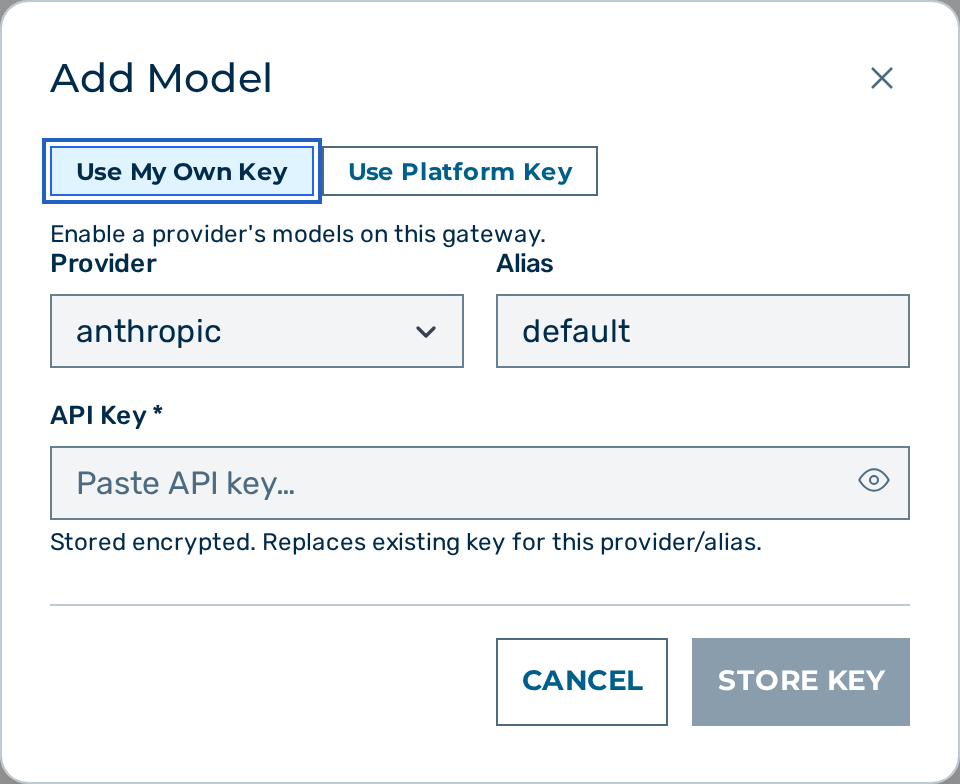 The key management page for a gateway.
Proceed as follows to add an OpenAI provider key:
- Open the Gateways view.
- Click on the Open → button of the gateway.
- The gateway detail view opens.
- Locate the Provider Keys card.
- Click on the + Add Model button.
- The Add Model dialog opens.
- Select openai in the Provider drop-down list.
- Enter
defaultin the Alias text field, or a custom alias when storing multiple keys. - Enter the OpenAI API key (starting with
sk-) in the API Key field. - Click on the Store Key button.
-> The new entry appears in the Provider Keys list. The key is stored encrypted and is used for every OpenAI request on this gateway.
To add the key via the API:
curl -s -X POST "https://gateway.example.com/admin/v1/gateways/{gateway_id}/keys" \
  -H "Cookie: aig_admin=<SESSION>" \
  -H "Content-Type: application/json" \
  -d '{
    "provider": "openai",
    "alias": "default",
    "key": "sk-..."
  }'
You can store multiple keys under different aliases and select among them per request using the x-aig-byok-alias header.
Model selection
There is no hardcoded model list. Pass any valid OpenAI model name and it is forwarded verbatim. Examples:
| Model name | Description |
|---|---|
gpt-4o |
Latest GPT-4o multimodal |
gpt-4o-mini |
Smaller, faster, cheaper GPT-4o variant |
o3-mini |
Reasoning model |
gpt-4-turbo |
GPT-4 Turbo |
💡 Note: Available models depend on your OpenAI account tier. The gateway does not validate model names — an invalid name results in a 404 from OpenAI which is returned as-is.
Request examples
Standard request
curl -s -X POST \
  "https://gateway.example.com/v1/myapp/production/openai/chat/completions" \
  -H "Content-Type: application/json" \
  -H "Authorization: Bearer <token>" \
  -d '{
    "model": "gpt-4o",
    "messages": [
      {"role": "system", "content": "You are a helpful assistant."},
      {"role": "user",   "content": "Explain LLM quantisation in one paragraph."}
    ],
    "temperature": 0.7,
    "max_tokens": 512
  }'
Streaming
Add "stream": true to receive server-sent events:
curl -s -X POST \
  "https://gateway.example.com/v1/myapp/production/openai/chat/completions" \
  -H "Content-Type: application/json" \
  -H "Authorization: Bearer <token>" \
  -d '{
    "model": "gpt-4o-mini",
    "messages": [{"role": "user", "content": "Count to 5."}],
    "stream": true
  }'
The gateway passes server-sent event (SSE) chunks through unchanged. A usage chunk — "choices": [] plus the token counts, the shape OpenAI's own stream_options.include_usage chunk uses — is emitted just before the [DONE] event.
See also
- Providers overview
- Azure OpenAI — for Azure-hosted OpenAI deployments
- OpenAI-compatible providers
- Gateway configuration