Anthropic
Myra AI Workspace translates the OpenAI chat completions format to the Anthropic Messages API and translates responses back. You send a standard OpenAI-shaped request; the gateway handles all protocol differences.
Request translation
| OpenAI field | Anthropic field | Notes |
|---|---|---|
messages[].role: "system" |
system (top-level) |
Placed in the top-level system field. On the compat path the last system message wins — multiple system messages are not concatenated |
messages[].role: "user" |
messages[].role: "user" |
Content forwarded as-is |
messages[].role: "assistant" |
messages[].role: "assistant" |
Content forwarded as-is |
max_tokens |
max_tokens |
Anthropic requires max_tokens. When it is omitted, or is larger than the model's real output ceiling, the gateway supplies/clamps it to that model's ceiling (see below) |
temperature |
temperature |
Direct mapping |
stream |
stream |
SSE pass-through |
System messages are extracted from the messages array and passed as the top-level system field. When more than one system message is present, the last one is used — they are not joined together. The remaining messages are forwarded in order.
Omitted or over-large max_tokens
Anthropic rejects a request with no max_tokens, and rejects one whose max_tokens exceeds the model's output ceiling. The gateway resolves that ceiling from the target model's identity (see Token-limit provenance) and, when the client omits max_tokens or sends a value above the ceiling, substitutes/clamps to the model's real ceiling. A recognised model with extended thinking always resolves a ceiling well above the minimum, so its reasoning can never consume the whole budget and leave an empty answer. An unrecognised model falls back to a small, universally-safe default that no Anthropic model rejects.
Endpoint
Native endpoint
Compat endpoint
The compat endpoint routes to Anthropic for any model whose name starts with claude-:
with "model": "claude-opus-4-6".
Adding an Anthropic API key
The gateway stores API keys using a bring-your-own-key (BYOK) mechanism. Keys are encrypted before being written to the database. The plaintext is never persisted.
Before you begin, ensure the following conditions are met:
- ☑ You have an Anthropic API key (starting with sk-ant-).
- ☑ The gateway exists and is accessible.
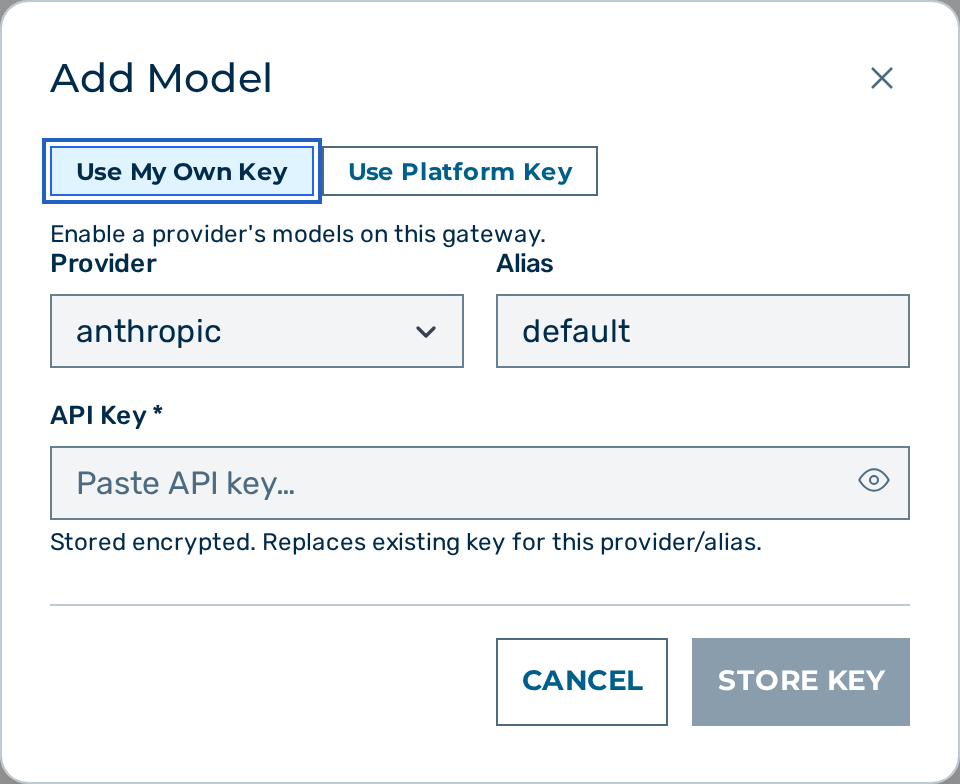 The key management page for a gateway.
Proceed as follows to add an Anthropic provider key:
- Open the Gateways view.
- Click on the Open → button of the gateway.
- The gateway detail view opens.
- Locate the Provider Keys card.
- Click on the + Add Model button.
- The Add Model dialog opens.
- Select anthropic in the Provider drop-down list.
- Enter
defaultin the Alias text field, or a custom alias when storing multiple keys. - Enter the Anthropic API key (starting with
sk-ant-) in the API Key field. - Click on the Store Key button.
-> The new entry appears in the Provider Keys list. The key is stored encrypted and is used for every Anthropic request on this gateway.
To add the key via the API:
curl -s -X POST "https://gateway.example.com/admin/v1/gateways/{gateway_id}/keys" \
  -H "Cookie: aig_admin=<SESSION>" \
  -H "Content-Type: application/json" \
  -d '{
    "provider": "anthropic",
    "alias": "default",
    "key": "sk-ant-..."
  }'
Request example
curl -s -X POST \
  "https://gateway.example.com/v1/myapp/production/anthropic/chat/completions" \
  -H "Content-Type: application/json" \
  -H "Authorization: Bearer <token>" \
  -d '{
    "model": "claude-opus-4-6",
    "messages": [
      {"role": "system",    "content": "You are a concise technical writer."},
      {"role": "user",      "content": "What is the difference between TCP and UDP?"}
    ],
    "max_tokens": 512,
    "temperature": 0.5
  }'
Extended thinking
The interleaved thinking feature of Anthropic exposes the reasoning steps of the model in the response. Enable it by passing the beta header via the provider pass-through mechanism:
curl -s -X POST \
  "https://gateway.example.com/v1/myapp/production/anthropic/chat/completions" \
  -H "Content-Type: application/json" \
  -H "Authorization: Bearer <token>" \
  -H "x-aig-provider-anthropic-beta: interleaved-thinking-2025-05-14" \
  -d '{
    "model": "claude-opus-4-6",
    "messages": [{"role": "user", "content": "Solve: 17 × 23 + 144 ÷ 12"}],
    "max_tokens": 1024
  }'
The gateway strips the x-aig-provider- prefix and forwards anthropic-beta: interleaved-thinking-2025-05-14 to Anthropic. Thinking blocks appear in the response content array alongside the final text block.
When a single answer is produced over multiple upstream legs — an automatic length-cap continuation, or a gateway tool loop — the thinking blocks from every leg are carried through in the response content array, in order, even when the response is internally buffered (for example on a privacy-enforced gateway). The usage object on such a multi-leg answer reports the sum of every leg's tokens — input_tokens, output_tokens, the flat cache_creation/cache_read counts, and the nested cache_creation.ephemeral_5m_input_tokens / ephemeral_1h_input_tokens breakdown — so the totals on the wire match what the gateway bills and persists, whether the answer was streamed live or buffered.
Dated model snapshots. A pinned Anthropic snapshot id (for example claude-sonnet-4-5-20250929) is treated identically to its alias (claude-sonnet-4-5) for the extended-thinking decision and the model's output-token limits: the gateway resolves the snapshot to the alias's capability entry, so a snapshot you request explicitly by model gets the same thinking parameter the alias would. Snapshots are not offered in the model picker, are never selected by the per-turn data-file Auto upgrade, and never win the create-time Auto default over their co-existing alias — so in normal use a snapshot is only ever routed when you name it yourself. (The sole exception: on a gateway whose only route is a snapshot, the create-time Auto default still resolves it rather than failing to route.)
💡 Note: Use
x-aig-provider-anthropic-betafor any Anthropic beta feature. Pass multiple beta flags as a comma-separated value following the header convention of Anthropic.
Prompt caching
Anthropic supports caching portions of the prompt to reduce cost and latency on repeated requests with long shared context. A cache entry has a time-to-live (TTL) of either 5 minutes or 1 hour, and each TTL is priced separately. When prompt caching is active, the response usage object includes these additional fields:
| Field | Description |
|---|---|
cache_creation_tokens |
Total tokens written to the cache on this request — the 5-minute and 1-hour tiers combined |
cache_creation_1h_tokens |
The part of cache_creation_tokens written with a 1-hour TTL |
cache_read_tokens |
Tokens read from the cache (not re-processed) |
These fields are recorded in the request log alongside input_tokens and output_tokens. See Request log fields for the per-leg accounting columns.
Cache pricing
Cache pricing differs from standard input pricing, and the two cache-write TTLs are priced differently. The gateway records cost_usd using these rates when cache token counts are present in the response.
| Token type | Relative price |
|---|---|
| Standard input | 1× |
| Cache write (5-minute TTL) | 1.25× input |
| Cache write (1-hour TTL) | 2× input |
| Cache read | 0.1× input |
The 1-hour portion (cache_creation_1h_tokens) is charged at the 1-hour rate; the remaining 5-minute portion (cache_creation_tokens minus cache_creation_1h_tokens) is charged at the 5-minute rate.
Context compaction
Context compaction automatically summarises older conversation turns when the estimated input token count exceeds a configured threshold. Compaction keeps long conversations within model context limits and reduces the cost of each subsequent turn.
How it works
Before forwarding a request to Anthropic, the gateway estimates the total input token count. When the estimate meets or exceeds the configured threshold_tokens value (default: 200 000) and Anthropic's minimum compaction threshold (50 000 tokens), the gateway injects the compact-2026-01-12 beta header and a context_management field into the request body — but only for models that declare Anthropic's native compact_20260112 strategy. Models that do not (for example claude-haiku-4-5, claude-sonnet-4-5, claude-opus-4-5) are skipped, because injecting the strategy for them is rejected with an HTTP 400; on the /easy surface those conversations are kept in the window by the separate, model-agnostic summarize path instead.
Anthropic's API then:
- Summarises older conversation turns. Which turns are kept verbatim is decided by Anthropic's native context management, not by the gateway.
- Replaces the verbatim history with the summary in subsequent turns.
- Returns a
compactioncontent block in the response alongside the assistant reply.
The gateway forwards a aig_status:compacted server-sent event to streaming clients that opted into the aig_* side channel (x-aig-turn-id / x-aig-extensions: 1) when a compaction block is detected in the response stream; a plain OpenAI-compatible client's stream carries only OpenAI-shaped chunks. The number of tokens saved by compaction is available in the request log.
Configuration
Context compaction is enabled by default for all gateways. It additionally requires the target model to support Anthropic's native compact_20260112 strategy; on a model that does not, native compaction is silently skipped (no strategy is injected, so no request fails because of it). To disable it for a specific gateway, set context_compaction.enabled to false in the gateway config.
| Field | Type | Default | Description |
|---|---|---|---|
context_compaction.enabled |
boolean | true |
Enable or disable context compaction for this gateway. |
context_compaction.threshold_tokens |
integer | 200000 |
Input token count that triggers compaction. Minimum: 50000. |
context_compaction.keep_last_turns |
integer | 10 |
Reserved. Not currently forwarded to Anthropic — retention is governed by Anthropic's native context management. |
💡 Note: Context compaction applies only to Anthropic models that support the native
compact_20260112strategy. For all other providers — and for Anthropic models without that strategy — the setting is present in the config but injects nothing.⚠️ Caution: Compacted summaries are generated by the model and may omit details present in the original conversation. For workloads that require exact conversation replay (for example, legal or audit trails), disable context compaction.
See Gateway Configuration Reference for the full field reference.
See also
- Providers overview
- Request logging — cache token fields in logs
- Gateway configuration