IP allowlist
The IP allowlist restricts which source IP addresses can send inference requests to a gateway. The gateway evaluates the allowlist in the access phase, after authentication.
How the IP allowlist works
When ip_allowlist contains one or more entries, any request from a source IP that does not match at least one entry is rejected with 403 Forbidden. An empty list (the default) allows all source IPs.
- CIDR notation is supported (e.g.
10.0.0.0/8,192.168.1.0/24). - A bare IP address without a prefix is treated as a
/32(exact match). - Both IPv4 and IPv6 addresses and CIDR ranges are supported.
- The check matches the real client IP taken from the leftmost
X-Forwarded-Forhop supplied by the trusted edge. When noX-Forwarded-Forheader is present (an in-cluster request), the check falls back to the immediate peer address (remote_addr).
💡 Note: The IP allowlist applies only to inference endpoints. Admin API requests are subject to separate access controls and are not filtered by the
ip_allowlistconfiguration of the gateway.⚠️ Trust boundary — the allowlist is only as strong as the edge that sets
X-Forwarded-For. The allowlist matches the leftmostX-Forwarded-Forentry. That entry is authoritative only when every hop in front of the gateway overwrites or normalizes any client-suppliedX-Forwarded-For. In the Myra deployment this normalization is performed by the Myra CDN (myracloud) in front of the origin — the gateway's own reverse-proxy tier only appends toX-Forwarded-Forand does not strip a client-supplied value. If you operate the gateway behind a proxy that does not replace a client-suppliedX-Forwarded-For(or expose the origin directly), a client can forge an allowlisted address and bypass this gate. Configure your edge so the client IP is derived from a trusted hop (for example nginxset_real_ip_from <trusted-proxy-ranges>+real_ip_header X-Forwarded-For+real_ip_recursive on) rather than from an unverified client-supplied header.
CIDR notation
| Entry | Matches |
|---|---|
203.0.113.42 |
Exactly 203.0.113.42 |
203.0.113.0/24 |
203.0.113.0 – 203.0.113.255 |
10.0.0.0/8 |
10.0.0.0 – 10.255.255.255 |
172.16.0.0/12 |
172.16.0.0 – 172.31.255.255 |
192.168.0.0/16 |
192.168.0.0 – 192.168.255.255 |
2001:db8::1 |
Exactly 2001:db8::1 |
2001:db8::/32 |
2001:db8:: – 2001:db8:ffff:…:ffff |
Load balancer forwarding
When the gateway sits behind a load balancer or reverse proxy, the allowlist matches the real client IP taken from the leftmost X-Forwarded-For hop, so it filters on the original client rather than the proxy's address. This is secure only if the frontmost trusted edge overwrites any client-supplied X-Forwarded-For and puts the genuine client IP in that leftmost position — the allowlist is only as trustworthy as that edge. An edge that merely appends to X-Forwarded-For (the common proxy_add_x_forwarded_for behaviour) leaves a client-supplied value as the leftmost hop, which a client can forge to spoof an allowlisted address. Ensure a trusted hop replaces the client-supplied header — for example with nginx set_real_ip_from <trusted-proxy-ranges> + real_ip_header X-Forwarded-For + real_ip_recursive on. When no X-Forwarded-For header is present, the allowlist falls back to the immediate peer address (remote_addr).
Block response format
When a request is blocked by the IP allowlist, the gateway returns:
The response also sets the X-AIG-Error: forbidden header. The allowlist reason (blocked_by: "ip_allowlist") is recorded only in the server-side request log — it is not included in the HTTP response body returned to the client.
Setting an IP allowlist
You can edit the IP allowlist directly in the Edit Gateway dialog of the SPA (under Search & tools → Tools & Access): add one CIDR entry per row, or remove entries to widen access. Leaving the list empty allows all source IPs. A malformed CIDR is flagged inline and rejected on save (the admin API returns 400 for the same input). You can also set it through the admin API as shown below.
Before you begin, ensure the following conditions are met:
- ☑ You have the
tenant_adminoradminrole. - ☑ The gateway already exists.
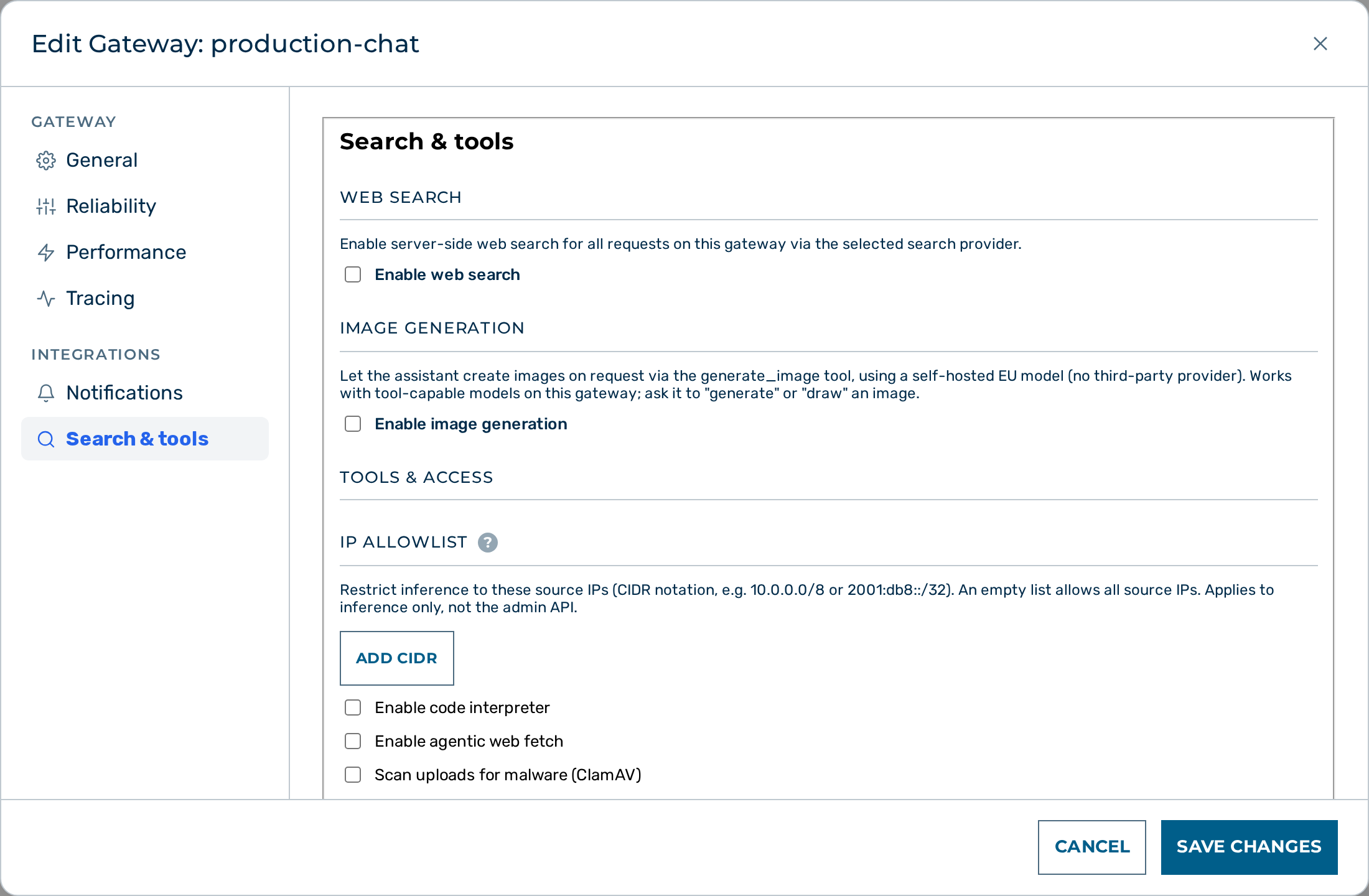
Proceed as follows to set an IP allowlist:
- Send a
PATCHrequest to set theip_allowlistfield of the gateway configuration:
curl -X PATCH "https://<your-gateway-host>/admin/v1/gateways/<ID>" \
  -H "Content-Type: application/json" \
  -d '{
    "config": {
      "ip_allowlist": [
        "203.0.113.10/32",
        "198.51.100.0/24"
      ]
    }
  }'
-> Requests from IP addresses outside the listed CIDR ranges are rejected with 403 Forbidden.
Removing the IP allowlist
Before you begin, ensure the following conditions are met:
- ☑ You have the
tenant_adminoradminrole. - ☑ The gateway already exists.
Proceed as follows to remove every entry and accept requests from any IPv4 address:
- Send a
PATCHrequest with an empty array:
curl -X PATCH "https://<your-gateway-host>/admin/v1/gateways/<ID>" \
  -H "Content-Type: application/json" \
  -d '{"config": {"ip_allowlist": []}}'
-> The gateway accepts requests from every source IP address.
API
The ip_allowlist field is part of the gateway config object. See Tenants & Gateways API for the PATCH endpoint and request examples.