Regex guardrail
The regex guardrail is a Tier 1 (in-process, sub-millisecond) guardrail that scans request and response content against named pattern libraries or custom expressions. It is the recommended starting point for detecting structured sensitive data such as personally identifiable information (PII), payment card numbers, credentials, and healthcare identifiers.
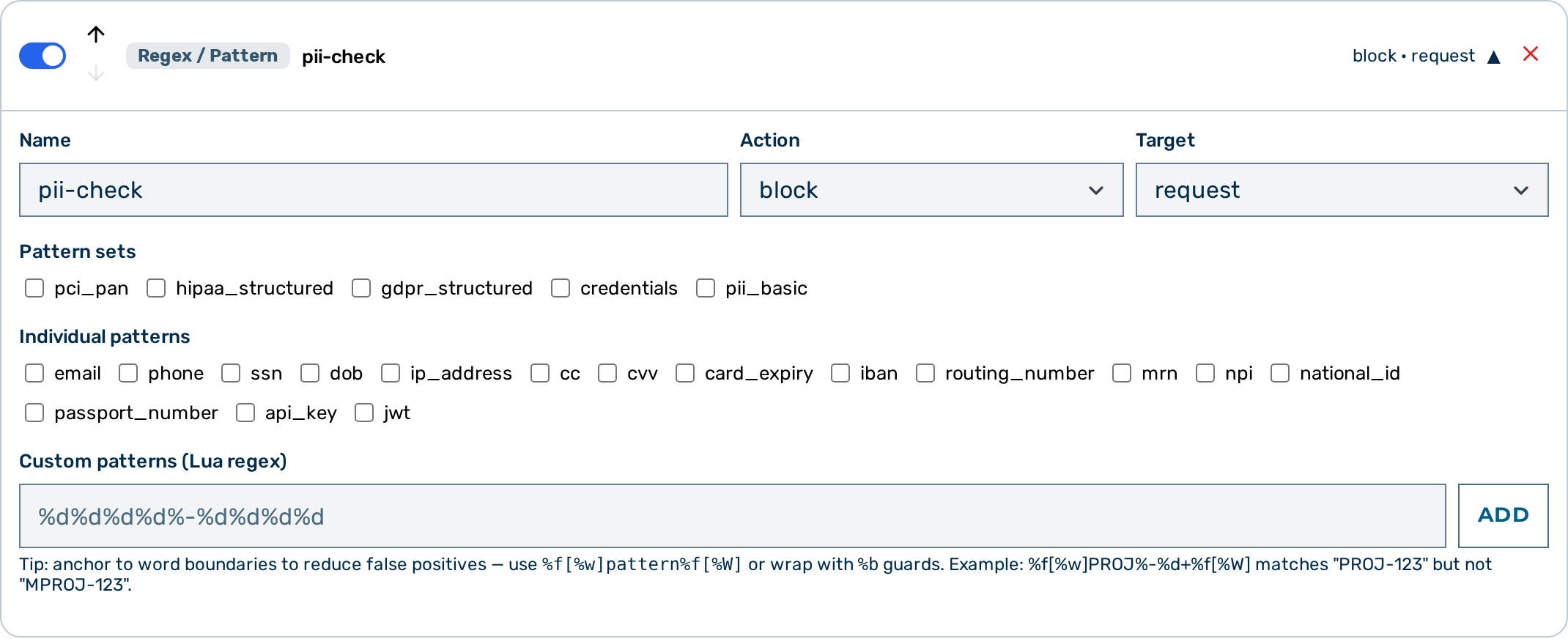 Regex guardrail editor
⚠️ Caution: A regex guardrail with no
patternsand nocustom_patternsmatches nothing — it is stored and listed, but the gateway returnspassfor it on every request. Apatternsentry that is not a known pattern or set name is silently ignored, so a typo (credit_cardforcc) leaves a non-empty list unable to fire.GET /admin/v1/gateways/<ID>/detectorsreports such a detector asactive: falsewithinactive_reason: "no_patterns", and the Guardrail Builder badges it No patterns.
When to use the regex guardrail
Use the regex guardrail when you need fast, deterministic matching of structured data formats. It adds no latency overhead. For unstructured PII detection — such as names, dates, or addresses expressed in natural language — use the NLP PII Detector (Tier 2) instead.
How it works
The guardrail evaluates the patterns array (named patterns) and the custom_patterns array (raw Lua-pattern strings) against the inspected body. Both lists are evaluated together. A single match from either list triggers the configured action.
For action: "scrub", each matched span is replaced independently with the scrub_placeholder value. If multiple spans match, each is replaced separately. The replacement is permanent — nothing restores the original value in the answer or in the stored conversation (see Verdicts); use the PII Protector guardrail when the model's answer needs to reference the real values.
Configuration reference
| Field | Type | Default | Description |
|---|---|---|---|
type |
string | — | Must be "regex" |
name |
string | — | Human-readable label for this guardrail instance |
action |
string | "flag" |
What to do on a match: block, scrub, or flag |
target |
string | "request" |
Which traffic to inspect: request, response, or both |
patterns |
array | [] |
Named patterns or pattern sets to match (see tables below) |
custom_patterns |
array | [] |
Raw Lua-pattern strings to match in addition to named patterns |
scrub_placeholder |
string | "[REDACTED]" |
Replacement text used when action is "scrub" |
Named patterns
Reference these by name in the patterns array. False positive (FP) rates are benchmarked across representative general-purpose and business text corpora.
| Name | Description | FP risk |
|---|---|---|
email |
Email addresses | Medium — 8% FP on business text |
phone |
Phone numbers (international format) | High — 26% FP; phone numbers appear in everyday queries |
ssn |
US Social Security Numbers (dashes optional) | High — 11.5% FP; 9-digit sequences match SSN format |
dob |
Dates of birth (MM/DD/YYYY or MM-DD-YYYY) | Low — 0% FP |
ip_address |
IPv4 addresses | High — 13% FP; IP addresses appear in technical text |
cc |
Credit/debit card numbers (Luhn-validated) | Low — 2% FP (Luhn check eliminates most false matches) |
cvv |
Card verification values | Low — 0% FP |
card_expiry |
Card expiry dates | Low — 1.5% FP |
iban |
International Bank Account Numbers | Low — 0% FP |
routing_number |
ABA routing numbers (9-digit) | Medium — 5% FP; 9-digit numbers are common |
mrn |
Medical Record Numbers | Low — 0% FP |
npi |
National Provider Identifiers | Low — 0.5% FP |
national_id |
National ID numbers | Low — 0% FP |
passport_number |
Passport numbers | Low — 0% FP |
api_key |
API key patterns (key=value format) | Low — 0% FP |
jwt |
JSON Web Tokens (ey... three-segment format) | Low — 0% FP |
💡 Note:
phone,ssn, andip_addresshave 11–26% false positive rates on general business text. Useaction: scrubrather thanaction: blockfor these patterns, or switch to the NLP PII Detector, which applies NLP context to reduce false detections.💡 Note: The
ccpattern applies a Luhn checksum check in addition to format matching. This significantly reduces false positives from 16-digit numbers that happen to match a card number format but are not valid card numbers.
Pattern sets
Pattern sets are shorthand aliases that expand to multiple named patterns. Use them in the patterns array the same way as individual pattern names.
| Set | Patterns included | FP risk |
|---|---|---|
pci_pan |
cc, cvv, card_expiry, iban, routing_number |
Low — all patterns are format-specific; cc is Luhn-validated |
hipaa_structured |
ssn, mrn, npi, dob, phone, email, ip_address |
High — includes phone, ssn, ip_address which have 11–26% FP on general text |
gdpr_structured |
email, phone, ip_address, iban, national_id, passport_number |
High — includes phone and ip_address |
credentials |
api_key, jwt |
Low — format-specific; 0% FP |
pii_basic |
email, phone, ssn |
High — includes phone and ssn |
💡 Note:
hipaa_structured,gdpr_structured, andpii_basicall include high-FP patterns. Useaction: scrubto redact matched content rather thanaction: block, which denies entire requests.pci_panandcredentialsare low-FP and suitable foraction: block.
Custom patterns
custom_patterns accepts raw pattern strings written in Lua pattern syntax — for example %d for a digit, %a for a letter, and the +/*/- quantifiers. Lua patterns are not POSIX ERE or PCRE: they have no {N} counted repetition, so a fixed-length run of characters is written out explicitly (for example %d%d%d%d for four digits). Custom patterns are evaluated alongside any named patterns in the same guardrail instance.
Example configurations
Block requests containing credit card numbers
curl -X PATCH "https://<your-gateway-host>/admin/v1/gateways/{id}" \
  -H "Cookie: aig_admin=<SESSION>" \
  -H "Content-Type: application/json" \
  -d '{
    "config": {
      "guardrails": [
        {
          "type": "regex",
          "name": "block-pci",
          "action": "block",
          "target": "request",
          "patterns": ["pci_pan"]
        }
      ]
    }
  }'
Scrub credentials from requests and responses
Detects API keys and JWTs in both the outbound request and the inbound model response, replacing any matches with a custom placeholder.
{
  "type": "regex",
  "name": "scrub-credentials",
  "action": "scrub",
  "target": "both",
  "patterns": ["credentials"],
  "scrub_placeholder": "[REDACTED-CREDENTIAL]"
}
Scrub HIPAA-structured identifiers from requests
{
  "type": "regex",
  "name": "hipaa-scrub",
  "action": "scrub",
  "target": "request",
  "patterns": ["hipaa_structured"]
}
Flag a custom internal ID format
Uses custom_patterns to match formats not covered by the named pattern library. This example flags any occurrence of an internal customer ID (CUST- followed by six digits), recording the match in the log without blocking or modifying the request.
{
  "type": "regex",
  "name": "internal-ids",
  "action": "flag",
  "target": "request",
  "custom_patterns": ["CUST-%d%d%d%d%d%d"]
}
💡 Note:
custom_patternsandpatternscan be combined in a single guardrail. Both lists are evaluated, and the configuredactionapplies if any pattern from either list matches.
Combine named patterns and custom patterns
{
  "type": "regex",
  "name": "combined-scrub",
  "action": "scrub",
  "target": "request",
  "patterns": ["pii_basic"],
  "custom_patterns": ["ACCT-%d%d%d%d%d%d%d%d%d%d"],
  "scrub_placeholder": "[PII]"
}
Configuring the regex guardrail
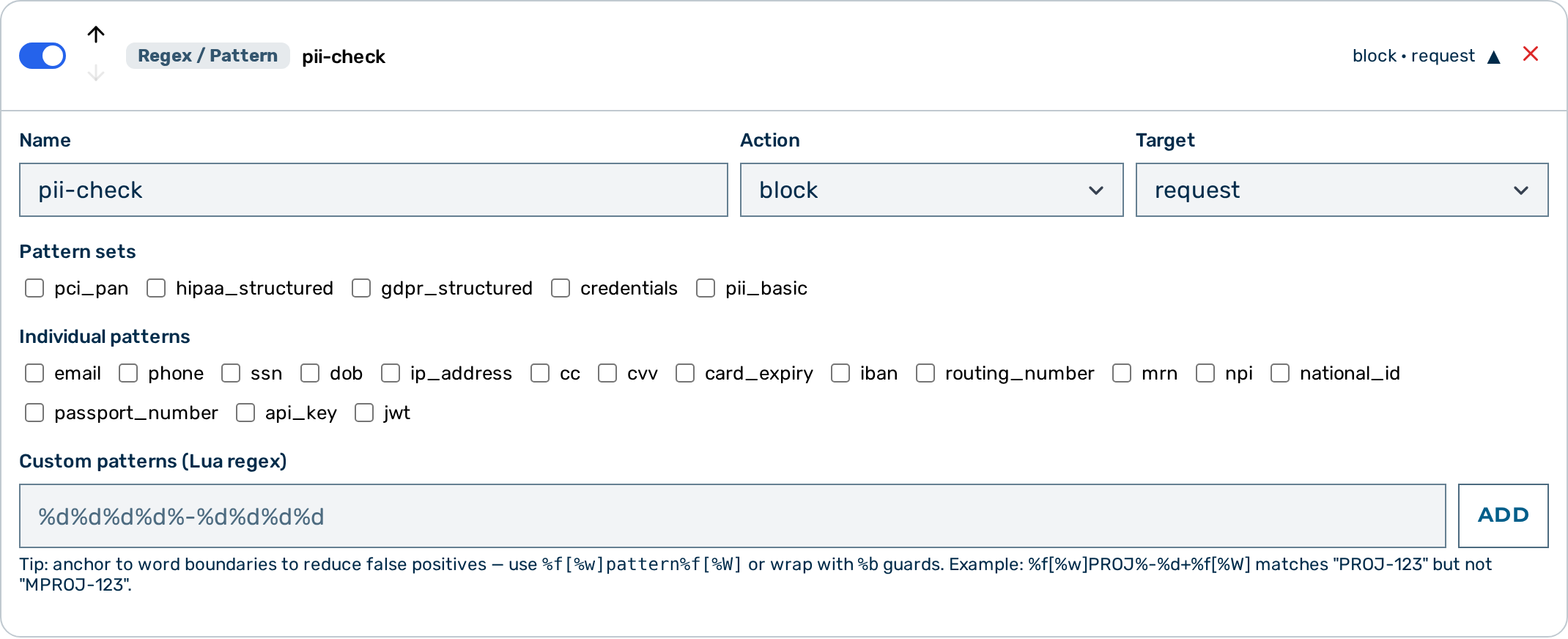 Regex guardrail card — expanded view
Proceed as follows to configure the regex guardrail in the Guardrail Builder:
- Open the gateway detail page and scroll down to the Guardrails card.
- Click on the + Regex / Pattern button.
- A collapsed regex guardrail card appears at the bottom of the list.
- Click on the card to expand it.
- Enter a name in the Name text field.
- Select the action from the Action drop-down list:
block,scrub, orflag. - Select the target from the Target drop-down list:
request,response, orboth. - Select one or more named pattern sets from the Pattern sets checkbox list (for example
pci_panorcredentials). - Select individual named patterns from the Individual patterns checkbox list (for example email, phone, or ssn). The Pattern sets and Individual patterns lists are tick-boxes — they do not accept raw expressions.
- To match an expression that is not in the named library, type a Lua pattern into the Custom patterns (Lua regex) field and click on the Add button (pressing Enter also adds it). Each added pattern appears as a removable chip; repeat for every custom pattern.
- When the action is
scrub, the card shows a warning that the replacement is irreversible — nothing puts the original value back, in the answer or in the stored conversation — and points at the PII Protector, which masks reversibly. - If the action is
scruband you require a custom placeholder, enter the replacement text in the Scrub placeholder text field. - Click on the Save Guardrails button.
-> The regex guardrail is saved and appears in the execution plan.
Pipeline position
The regex guardrail is Tier 1 — it runs in-process with no external calls. All Tier 1 guardrails run before any Tier 2 guardrail. When multiple regex guardrails are configured, they run in the order they appear in the guardrails array.
A block verdict from this guardrail stops the pipeline immediately. No subsequent guardrails run.