Guardrails
💡 Note: This page is the configuration reference for building a guardrail pipeline — create, edit, order, and manage guardrails. For the concept (tiers, verdict lifecycle, targets), see Guardrails. For the guardrails overview and the comparison table that helps you pick one, see Data protection and compliance.
Myra AI Workspace evaluates every request and response through a configurable guardrail pipeline. Each guardrail inspects message content and returns a verdict — block, scrub, or flag — that controls how the gateway handles the traffic.
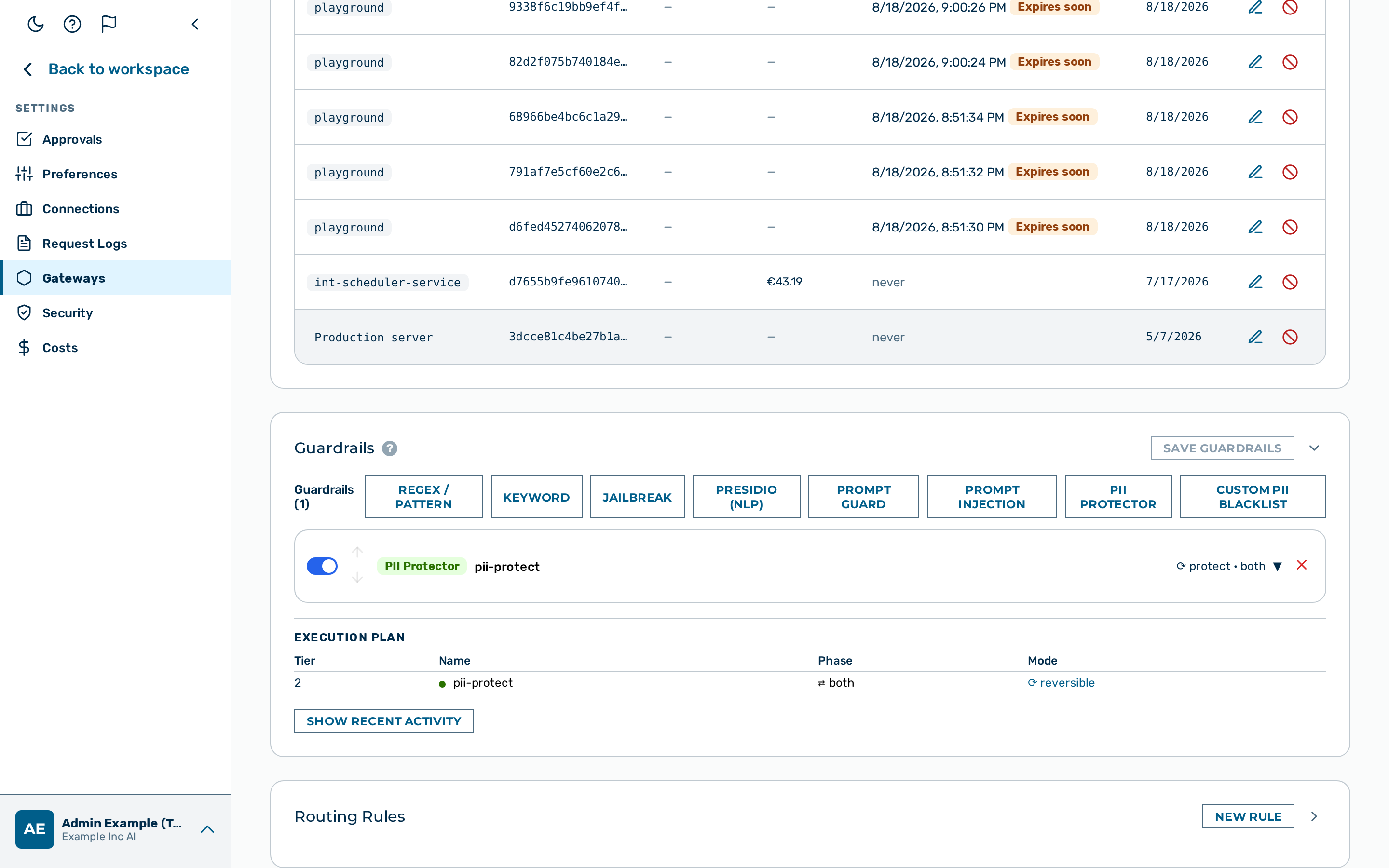 Guardrail Builder
Two-tier architecture
Guardrails are grouped into two tiers based on where they execute and how fast they run.
| Tier | Guardrail types | Execution | Latency |
|---|---|---|---|
| Tier 1 | regex, keyword, jailbreak, json_schema, contains_code, gibberish, language, custom_pii |
In-process | Sub-millisecond |
| Tier 2 | presidio, prompt_guard, prompt_injection, pii_protector |
Sidecar HTTP call | Milliseconds |
All Tier 1 guardrails run before any Tier 2 guardrail. Within the same tier, guardrails run in the order they appear in the guardrails array of the gateway configuration.
Execution order and verdict behaviour
The pipeline processes guardrails sequentially.
| Verdict | Effect on pipeline |
|---|---|
block |
The request is denied immediately. No further guardrails run. |
scrub |
Matched content is replaced in the body. The pipeline continues. |
flag |
The match is recorded in the log entry. The pipeline continues. |
A block verdict from any single guardrail stops the entire pipeline. scrub and flag verdicts are non-terminal — the remaining guardrails still run after the match is recorded or the content is redacted.
The diagram below shows the path of a request through both tiers. A block verdict is terminal and returns a structured error; scrub and flag keep the request on the solid path toward the provider.
flowchart TD
    REQ([Request]) --> T1G1
    subgraph TIER1 [Tier 1 — in-process, sub-millisecond]
        direction TB
        T1G1[Guardrail 1] --> T1G2[Guardrail 2] --> T1GN[Guardrail n]
    end
    T1GN --> T2G1
    subgraph TIER2 [Tier 2 — sidecar, milliseconds]
        direction TB
        T2G1[Guardrail 1] --> T2GN[Guardrail n]
    end
    T2GN --> PROV([Provider])

    T1G1 -. block .-> STOP
    T1G2 -. block .-> STOP
    T1GN -. block .-> STOP
    T2G1 -. block .-> STOP
    T2GN -. block .-> STOP
    STOP([Stop — structured error returned])
On the solid path, each guardrail returning pass, scrub, or flag hands the request to the next guardrail; only block diverts to the terminal error.
Targets
Each guardrail declares which traffic direction it inspects.
| Target | Description |
|---|---|
request |
Inspect the outbound request body (default) |
response |
Inspect the inbound model response body |
both |
Inspect both the request and the response |
Verdict actions
block
The request is denied. The caller receives a synthetic HTTP 200 response containing an assistant-role message that describes the reason for blocking. No upstream model call is made.
⭐ Example: Block message:
The reason after the colon is the raw pattern or category name (
cchere). Only Llama-Guard safety codes (S1–S14) are expanded to a human-readable label; a regex or keyword pattern name is carried through verbatim.
For streaming requests, the synthetic block message is delivered as SSE events using the same format the model uses. Streaming clients do not need special handling.
scrub
Matched content is replaced with a placeholder string before the body is forwarded. The default placeholder is [REDACTED]. The regex and keyword guardrails allow a custom value via scrub_placeholder.
A scrub is destructive unless the guardrail performing it is the PII Protector. The word names one verdict but two different operations, and only one of them is reversible:
| Guardrail | What replaces the value | Restored? |
|---|---|---|
| PII Protector | An opaque token derived from the value itself, so the same value yields the same token throughout a conversation | Yes — put back in the response before it reaches the client, and selectable in the pre-send masking preview |
| Custom PII Blacklist | An opaque positional token ([MYRA-CUSTOM:…]) |
Yes in the response — but deliberately not user-selectable in the masking preview: the list is administrator-defined, so a user may not lift it |
| NLP PII Detector | A static label such as <PERSON> |
No |
| Regex · Keyword | The scrub_placeholder value, [REDACTED] by default |
No |
An irreversible scrub destroys the value for the whole turn: the model answers about the placeholder, that answer is what is stored, and nothing can recover the original afterwards. Choose it when the provider must never see the data and the answer does not need to refer to it; choose the PII Protector when the answer does. The Guardrail Builder labels the irreversible ones destructive in its execution plan so the two are distinguishable on the one screen that lists them together.
⚠️ Caution: Only
presidio,regex,keyword,pii_protectorandcustom_piirewrite the body. Every other guardrail detects but does not rewrite, so a configuredaction: "scrub"is not performed — each applies its own fallback instead:jailbreak,prompt_guard,json_schema,contains_code,gibberishandlanguagetreat it asflag, andprompt_injectiontreats it asblock. The Guardrail Builder does not offerscrubon the cards it renders for those types, and its execution plan shows the action that will actually be applied; a value already stored stays visible and selectable so an existing configuration can still be saved.
flag
The match is recorded in the gateway log entry for the request. The body is not modified and the request is not blocked.
Tier 2 availability and fail_open
Tier 2 guardrails make an HTTP call to a locally hosted sidecar service running within Myra's certified infrastructure. Prompt content never leaves the Myra perimeter. When the sidecar is unavailable, the fail_open setting controls what happens.
fail_open |
Sidecar unavailable |
|---|---|
true (default) |
Request passes through as if no match occurred |
false |
Request is blocked |
💡 Note:
prompt_injectionis the exception: it defaults to fail-closed (fail_open: false), so a sidecar outage blocks the request rather than letting it through. Thefail_open: truedefault in the table above applies to the other Tier 2 detectors.💡 Note:
fail_openalso governs an in-process (Tier 1) detector that errors — a detector crash or an unknown detector type resolves through the samefail_opensetting, not only a Tier 2 sidecar outage.⚠️ Caution: Set
fail_open: falsewhen the sidecar is a hard dependency for your security policy. With the defaultfail_open: true, a sidecar outage allows all traffic through uninspected.
Log fields
Every guardrail that runs produces structured output. The following fields are set on the gateway log entry for the request.
| Field | Type | Description |
|---|---|---|
blocked |
boolean | true if any guardrail blocked the request |
blocked_by |
string | Name of the guardrail that issued the block verdict |
block_reason |
string | Pattern name or category code that triggered the block |
detectors_fired |
array | Names of all guardrails that returned a block, scrub, or flag verdict. A detector that only errored (a degraded verdict) is not listed here. |
Creating a guardrail
Guardrails are configured using the visual Guardrail Builder, which is available in two places:
- Existing gateway — open the gateway detail page, then scroll down to the Guardrails card.
- New gateway — the Guardrail Builder is embedded at the bottom of the New Gateway modal.
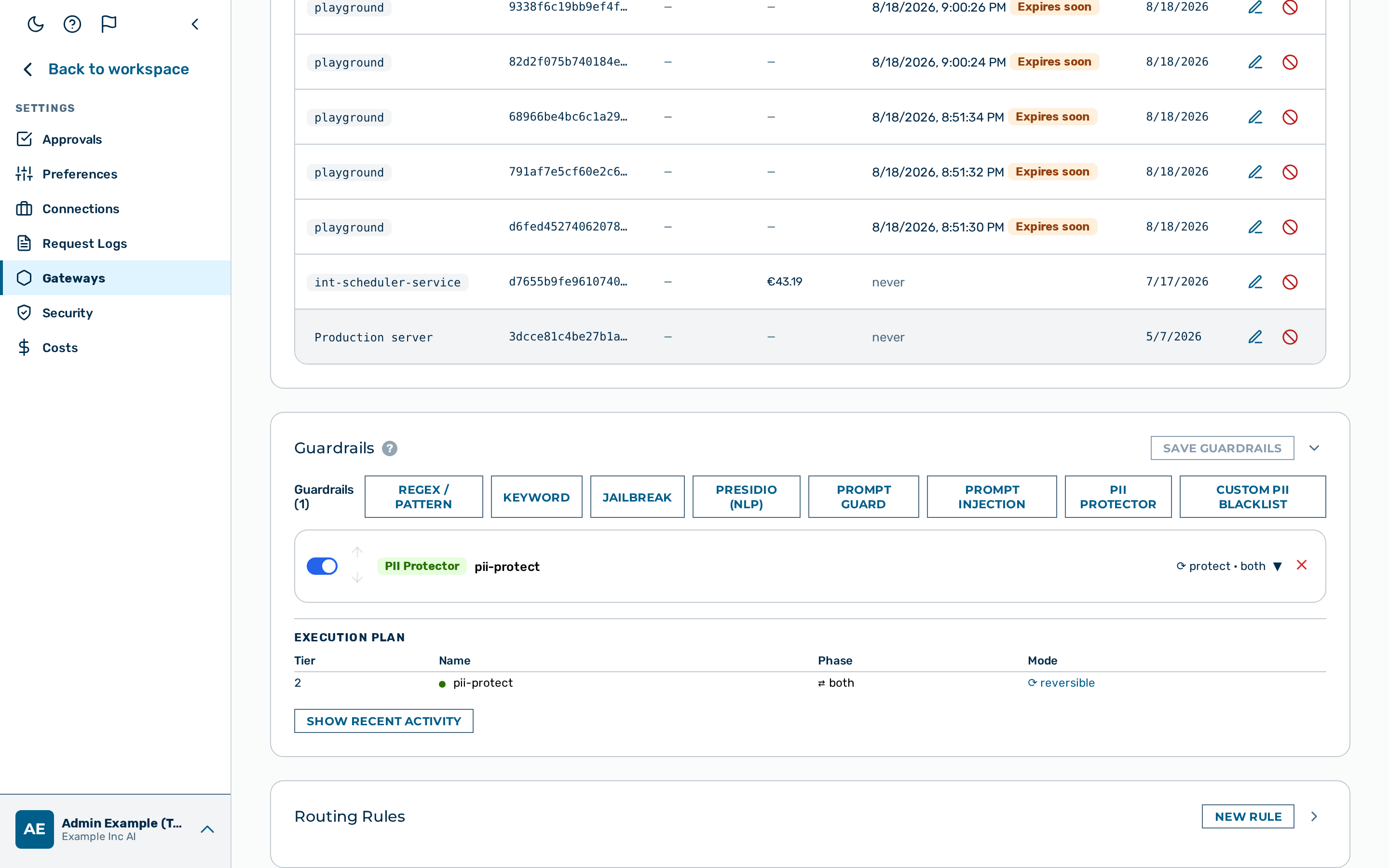 Guardrail Builder — type buttons
Proceed as follows to create a guardrail:
- Open the gateway detail page or the New Gateway modal.
- The Guardrail Builder appears at the bottom of the page or modal.
- Click on the button for the guardrail type you want to add:
- + Regex / Pattern — named pattern library and custom regex
- + Keyword — exact string matching
- + Jailbreak — zero-config detector pre-loaded with 18 known attack phrases
- + Presidio (NLP) — NLP-based PII detection
- + Prompt Guard — semantic safety classification (Llama Guard 3, locally hosted)
- + Prompt Injection — prompt-injection classification (Llama Prompt Guard 2, locally hosted; fail-closed by default)
- + PII Protector — reversible PII tokenisation
- + Custom PII Blacklist — reversible masking of admin-defined keywords (client names, codenames, surnames)
- A collapsed guardrail card appears at the bottom of the list.
- Click on the guardrail card to expand it.
- Enter a name in the Name text field.
- Select the action from the Action drop-down list:
block,scrub(not available on Jailbreak or Prompt Guard), orflag.
💡 Note: The Custom PII Blacklist guardrail type has no action selector. Masking is always active and cannot be configured to block or flag. 6. Select the target from the Target drop-down list:
request(default),response, orboth. 7. Configure any type-specific fields (patterns, keywords, entities, etc.). See the relevant guardrail type page for field details. 8. If required, use the ▲▼ arrows on the left side of each guardrail card to reorder guardrails within the list. Order matters within a tier — Tier 1 always runs before Tier 2, but within the same tier execution follows list order. 9. Click on the Save Guardrails button in the Guardrails card header (on an existing gateway), or complete the rest of the form and click on Create Gateway (in the New Gateway modal).
-> The guardrail is saved. The Execution plan table below the guardrail list updates to show the new guardrail in execution order.
Editing a guardrail
Proceed as follows to edit a guardrail:
- Open the gateway detail page.
- The Guardrail Builder shows the configured guardrail list.
- Click on the guardrail card you want to edit.
- The card expands to show the configuration fields.
- Update the required fields.
- Click on the Save Guardrails button.
-> The updated guardrail configuration is saved.
Deleting a guardrail
Proceed as follows to delete a guardrail:
- Open the gateway detail page.
- The Guardrail Builder shows the configured guardrail list.
- Click on the × button on the right side of the guardrail card header you want to remove.
- The card is removed from the list immediately.
- Click on the Save Guardrails button.
-> The guardrail is deleted. The Execution plan table updates to reflect the removal.
API
Guardrails are configurable via the Admin API as the guardrails array in the gateway configuration. See Tenants & Gateways API and the Gateway Configuration Reference for details.
Guardrail types
| Type | Tier | Description |
|---|---|---|
regex |
1 | In-process regex and named pattern matching |
keyword |
1 | In-process exact keyword matching |
jailbreak |
1 | Pre-configured jailbreak and prompt-injection detector — zero configuration required |
json_schema |
1 | Validates model responses against a declared JSON schema — enforces structured output |
contains_code |
1 | Detects source code in requests or responses |
gibberish |
1 | Detects low-quality or incoherent model responses using entropy and vocabulary heuristics |
language |
1 | Detects the dominant writing system of request or response text — permits or blocks by script |
custom_pii |
1 | Reversible masking of admin-defined keywords — client names, codenames, and surnames masked before reaching the model |
presidio |
2 | NLP-based PII detection — locally hosted within Myra's certified infrastructure |
prompt_guard |
2 | Safety classification via Llama Guard 3 — locally hosted within Myra's certified infrastructure |
prompt_injection |
2 | Prompt-injection classification via Llama Prompt Guard 2 — multilingual, scans requests and tool results; fail-closed by default |
pii_protector |
2 | Reversible PII tokenisation — real values restored in response |
See also
- Guardrails — the concept: tiers, verdict lifecycle, and targets
- Data protection and compliance — the guardrails overview and comparison table
- Regex guardrail
- Keyword guardrail
- Jailbreak guardrail
- JSON Schema guardrail
- Code detection guardrail
- Gibberish detector
- Language guardrail
- NLP PII detector
- Prompt Guard
- Prompt Injection
- PII Protector
- Custom PII Blacklist
- Logs API —
blocked_by,block_reason,guardrail_verdictfields - Gateway Configuration Reference —
guardrailsarray