Routing rules
Routing rules let you redirect incoming requests to specific providers and models based on attributes of the request. The gateway evaluates rules in descending priority order. The first rule whose conditions all match is applied — evaluation stops there. If no rule matches, the gateway uses the provider and model from the original request.
How evaluation works
- Rules are evaluated in descending priority order — a higher number means higher priority, and is evaluated first.
- First match wins: evaluation stops at the first rule whose conditions all match.
- All conditions within a single rule are combined with a logical AND.
- If no rule matches, the gateway forwards the request using the provider and model specified in the original request.
💡 Note: Priority values do not need to be contiguous. Using increments of 10 (10, 20, 30 …) leaves room to insert rules between existing ones without renumbering.
Condition fields
| Field | Matches against |
|---|---|
model |
The model field in the request body |
provider |
The provider name resolved for this gateway |
tenant_id |
The tenant identifier in the request URL |
header:{name} |
The value of HTTP header {name} (e.g. header:x-customer-tier) |
meta:{key} |
The value of x-aig-meta-{key} header (e.g. meta:region) |
Operators
| Operator | Description |
|---|---|
eq |
Exact equality match |
neq |
Not equal |
prefix |
Value starts with the specified string |
contains |
Value contains the specified string |
regex |
Value matches the specified Lua string pattern. This is Lua's pattern syntax, not PCRE/standard regex — use %d/%w (not \d/\w), character classes with %, and note there is no | alternation. An invalid pattern fails the condition (and is logged), never matches everything. |
Actions
| Field | Type | Description |
|---|---|---|
provider |
string | Route the request to this provider. |
model |
string | Replace the model name with this value when forwarding. |
fallbacks |
array | Ordered list of {provider, model} objects to try if the primary fails. |
load_balance |
object | Distribute matching requests across several weighted targets. See Load balancing. |
timeout_ms |
integer | Per-rule upstream timeout (ms) for the leg this rule routes, replacing the built-in stall budgets. Positive integer, max 3600000. See the Routing rules API. |
💡 Note: Anywhere a target takes a
model, themodel@providershorthand sets both in one string — e.g."model": "gpt-4o@openai"is equivalent to{"provider": "openai", "model": "gpt-4o"}.
Creating a routing rule
Before you begin, ensure the following conditions are met:
- ☑ You have admin access.
- ☑ A gateway exists.
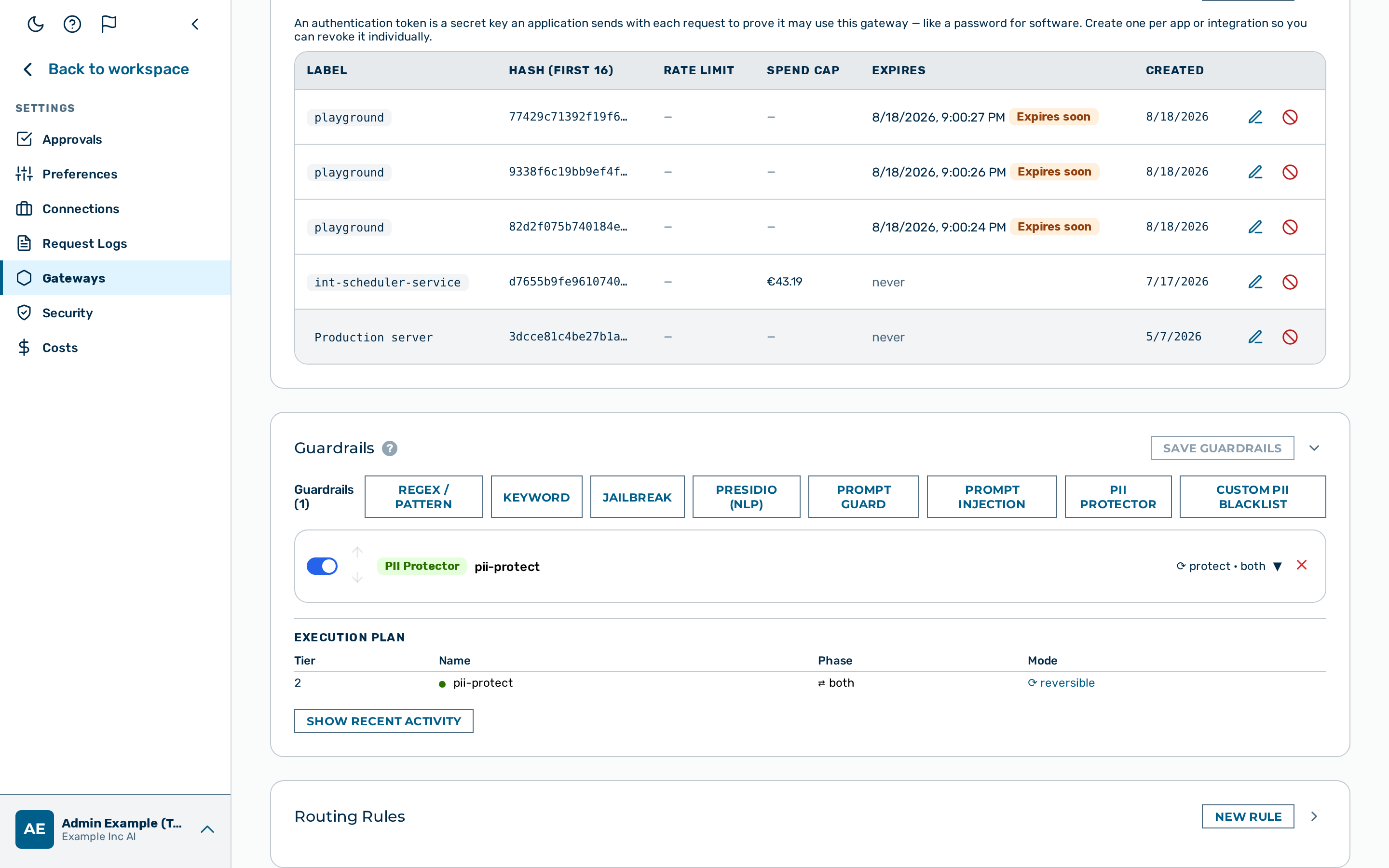 The routing rules list on the gateway detail page.
Proceed as follows to create a routing rule:
- Open Gateways in the left sidebar.
- The gateway list opens.
- Click on the gateway you want to configure.
- The gateway detail page opens.
- Scroll to the Routing Rules card.
- The card is collapsed on first load; only its header is visible.
- Click on the expand control in the Routing Rules card header.
- The rule list opens, showing all rules in priority order.
- Click on the + New Rule button.
- The rule editor opens.
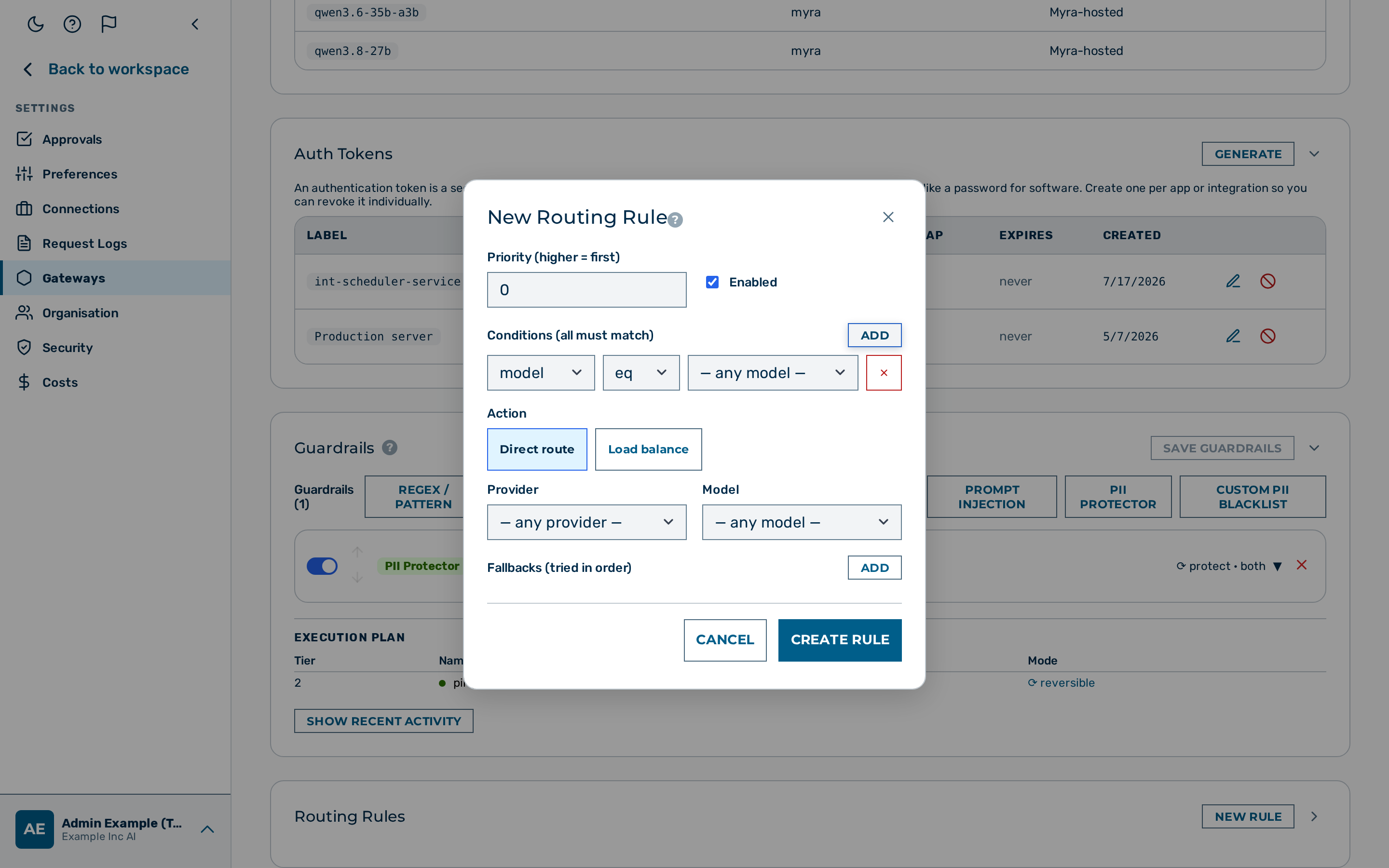 The routing rule editor.
- Enter a value in the Priority text field (use increments of 10 to leave room for future insertions).
- The priority value is set.
- Click on the + Add button to add one or more conditions.
- A condition row appears.
- Select the field from the Field drop-down list.
- The field is set.
- The Field drop-down list offers model, provider, tenant_id, header, and meta.
- If you select header or meta, enter the header name or the metadata key in the name text field that appears beside the Field drop-down list.
- The composed condition field reads
header:<name>ormeta:<key>. - Select the operator from the Operator drop-down list.
- The operator is set.
- Enter the match value in the Value text field.
- The condition is complete.
- Select the target provider from the Provider drop-down list in the Actions section.
- The provider is set.
- If required, enter a model name in the Model text field to rewrite the model name when forwarding.
- The model rewrite is set.
- Toggle the Enabled toggle on.
- The rule is marked active.
- Click on the Create Rule button.
-> The routing rule is created and appears in the rule list in priority order.
Editing a routing rule
Proceed as follows to edit a routing rule:
- Open Gateways in the left sidebar.
- The gateway list opens.
- Click on the gateway that contains the rule.
- The gateway detail page opens.
- Scroll to the Routing Rules card.
- The card is collapsed on first load; only its header is visible.
- Click on the expand control in the Routing Rules card header.
- The rule list opens.
- Click on the rule you want to edit.
- The rule editor opens with the current values.
- Edit the required fields.
- The fields are updated.
- Click on the Save Rule button.
-> The routing rule is updated with the new values.
Deleting a routing rule
Proceed as follows to delete a routing rule:
- Open Gateways in the left sidebar.
- The gateway list opens.
- Click on the gateway that contains the rule.
- The gateway detail page opens.
- Scroll to the Routing Rules card.
- The card is collapsed on first load; only its header is visible.
- Click on the expand control in the Routing Rules card header.
- The rule list opens.
- Click on the rule you want to delete.
- The rule editor opens.
- Click on the Delete button.
- A confirmation dialogue appears.
- Click on the Confirm button.
-> The routing rule is deleted and removed from the rule list.
Common patterns
Route by model prefix
Send all gpt-* requests to OpenAI and all claude-* requests to Anthropic:
[
  {
    "priority": 10,
    "conditions": [{"field": "model", "op": "prefix", "value": "gpt-"}],
    "actions": {"provider": "openai", "model": "gpt-4o"},
    "enabled": true
  },
  {
    "priority": 20,
    "conditions": [{"field": "model", "op": "prefix", "value": "claude-"}],
    "actions": {"provider": "anthropic", "model": "claude-sonnet-4-6"},
    "enabled": true
  }
]
Route by tenant
Send a specific tenant's traffic to a dedicated provider account:
{
  "priority": 5,
  "conditions": [{"field": "tenant_id", "op": "eq", "value": "enterprise-corp"}],
  "actions": {
    "provider": "openai",
    "model": "gpt-4o"
  },
  "enabled": true
}
Route by custom header
Use a customer tier header to select a model:
{
  "priority": 15,
  "conditions": [
    {"field": "header:x-customer-tier", "op": "eq", "value": "premium"}
  ],
  "actions": {
    "provider": "openai",
    "model": "gpt-4o"
  },
  "enabled": true
}
Route by metadata
Route requests tagged with a region metadata header:
{
  "priority": 20,
  "conditions": [
    {"field": "meta:region", "op": "eq", "value": "eu"}
  ],
  "actions": {
    "provider": "azure",
    "model": "gpt-4o"
  },
  "enabled": true
}
Attach the metadata with x-aig-meta-region: eu on the inference request.
API
Routing rules are fully manageable via the Admin API. See Routing Rules API for endpoint reference and request/response examples.