Fallback and retry
AI providers occasionally become unavailable, apply rate limits, or return errors during high-traffic periods. Without a fallback, the gateway returns an error to the caller. With a fallback chain, the gateway silently retries against another provider and the caller receives a response.
Fallbacks are defined per routing rule and are transparent to the caller — the response format is the same regardless of which provider in the chain ultimately handled the request.
How the fallback chain works
A request follows this sequence:
- Primary provider —
retry_countis the number of retries after the first attempt, so the primary is attempted up toretry_count+ 1 times on server errors (HTTP 5xx) and rate-limit responses (HTTP 429, retried with back-off honouringRetry-After). The defaultretry_countof 2 therefore gives 3 attempts (1 initial attempt plus 2 retries). - Fallback providers — each fallback is attempted once, in order.
retry_countapplies only to the primary provider. Fallbacks are defined in the routing rule that matched the request. - If all providers are exhausted, the terminal status reflects the last failure in the chain. A server or connection error ends in
502 all_providers_failed, but a final429surfaces429 rate_limited(forwarding the provider'sRetry-After), a read timeout504, and an oversized body413. A deterministic policy refusal on the final attempt (data residency, provider allowlist, sub-processor objection, a deprecated/unpriced/disabled model, the role model-mask, or a provider auth-config error) surfaces its own status rather than a masking502. See Terminal status by last failure.
flowchart LR
    Start([Request]) --> P1

    subgraph Primary ["Primary provider"]
        P1[Attempt 1] -- "5xx / 429" --> P2[Attempt 2]
        P2 -- "5xx / 429" --> P3[Attempt 3]
    end

    P1 -- "4xx (except 429)" --> Bail(["Return 4xx immediately<br/>no retry or fallback"])
    P3 -- "5xx / 429" --> F1[Fallback 1]
    F1 -- "5xx / 429" --> F2[Fallback 2]
    F2 -- "5xx (last failure)" --> E([502 all_providers_failed])
    F2 -- "429 (last failure)" --> R([429 rate_limited])
Client errors
A client error response from a provider (HTTP 4xx — for example, bad request, unauthorised, not found) is treated as a definitive failure. The gateway does not fall back to another model and, in general, does not retry. The error is returned to the caller immediately.
A narrow set of transparent, gateway-side self-recoveries are the exception to "no retry": when the gateway can see that its own request body caused the 4xx, it fixes the body and re-sends the same model once — stripping a deprecated parameter, dropping a forced tool_choice the backend cannot honour, removing gateway-injected tools the backend refuses, or stripping an unsupported reasoning parameter. These never change the model, never fire more than once per turn, and never fire after streaming has begun; if the single resend also fails, the original 4xx is surfaced.
HTTP 429 (rate limited) is the exception and is not treated as a definitive failure: the gateway retries it against the primary with back-off (honouring the provider's Retry-After header) and, once the primary's attempts are exhausted, falls through to the fallback chain just like a 5xx.
💡 Note: This prevents pointless retries: if your request is malformed or your API key is invalid, retrying against another provider will not help. A 429 is different — it is transient, so it is retried and does fall through the chain.
retry_count
retry_count controls the number of retries against the primary provider after the first attempt (not the total number of attempts). The primary is therefore attempted retry_count + 1 times. Only the primary provider uses retry_count; each fallback is tried exactly once. Set it in the gateway config:
curl -X PATCH https://your-gateway-host/admin/v1/gateways/{id} \
  -H "Cookie: aig_admin=<SESSION>" \
  -H "Content-Type: application/json" \
  -d '{"config": {"retry_count": 3}}'
retry_count |
Primary attempts | Retries |
|---|---|---|
1 |
2 | 1 |
2 |
3 | 2 |
3 |
4 | 3 |
Fallback configuration in routing rules
Fallbacks are defined in the actions object of a routing rule:
{
  "priority": 10,
  "conditions": [
    {"field": "model", "op": "prefix", "value": "gpt-"}
  ],
  "actions": {
    "provider": "openai",
    "model": "gpt-4o",
    "fallbacks": [
      {"provider": "anthropic", "model": "claude-sonnet-4-6"},
      {"provider": "gemini", "model": "gemini-2.0-flash"}
    ]
  },
  "enabled": true
}
Each entry in fallbacks is attempted once, in array order.
💡 Note: The per-rule
timeout_msaction bounds every leg of this rule — the primary and each fallback leg alike. See thetimeout_msaction in the routing rules API reference.
Configuring fallback providers
Before you begin, ensure the following conditions are met:
- ☑ You have admin access.
- ☑ A gateway with at least one routing rule exists.
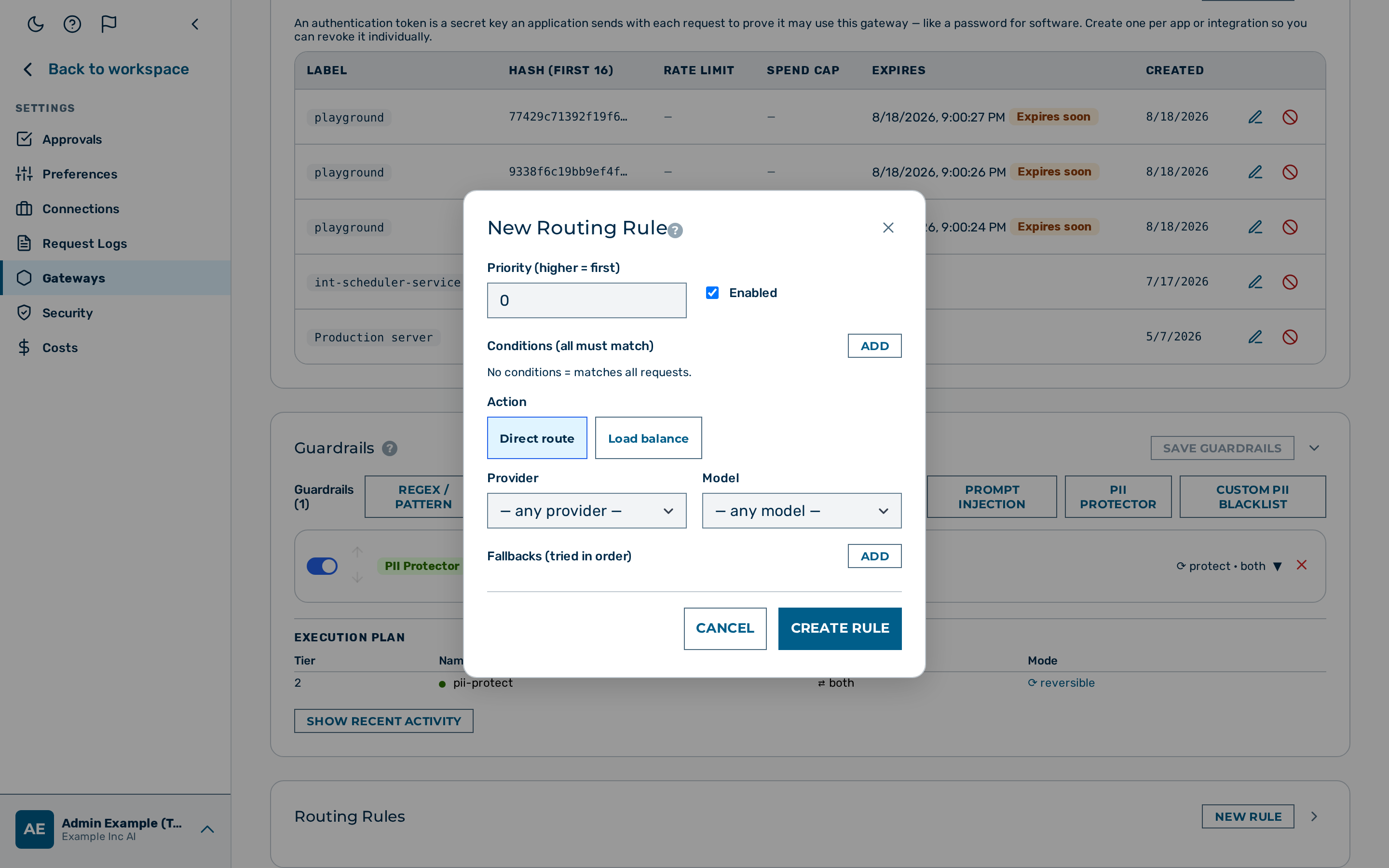 The fallbacks section of the routing rule editor.
Proceed as follows to add fallback providers to a routing rule:
- Open Gateways in the left sidebar.
- The gateway list opens.
- Click on the gateway you want to configure.
- The gateway detail page opens.
- Scroll to the Routing Rules card.
- The rule list opens.
- Click on the routing rule you want to edit.
- The rule editor opens.
- Scroll to the Fallbacks section.
- The fallbacks list is visible.
- Click on the + Add button.
- A new fallback row appears.
- Select the fallback provider from the Provider drop-down list.
- The provider is set.
- Enter the model name in the Model text field.
- The model is set.
- Repeat steps 6–8 for each additional fallback provider, in the order the gateway should try them.
- Each fallback is added to the list.
- Click on the Save Rule button.
-> The routing rule is updated with the configured fallback chain.
To create the same configuration via the API:
curl -X POST https://your-gateway-host/admin/v1/gateways/{id}/rules \
  -H "Cookie: aig_admin=<SESSION>" \
  -H "Content-Type: application/json" \
  -d '{
    "priority": 10,
    "conditions": [{"field": "model", "op": "prefix", "value": "gpt-"}],
    "actions": {
      "provider": "openai",
      "model": "gpt-4o",
      "fallbacks": [
        {"provider": "anthropic", "model": "claude-sonnet-4-6"},
        {"provider": "gemini", "model": "gemini-2.0-flash"}
      ]
    },
    "enabled": true
  }'
BYOK key swap on provider change
When a fallback triggers a provider change, the gateway automatically selects the BYOK (bring your own key) key for the new provider. The x-aig-byok-alias header applies only to the primary (originally requested) provider; a fallback provider always uses its default-alias key (the header is not re-applied to fallback providers).
A BYOK key must be stored for each key-requiring provider in the fallback chain. Keyless providers (the Myra EU fleet) need no stored key — a fallback leg to them dispatches without one. If no key is found for a key-requiring fallback provider, that fallback leg is silently skipped (the gateway logs a warning) and the chain continues to the next fallback. No 424 is raised for a fallback leg — the 424 provider_key_missing error is emitted only for the primary (originally requested) provider, before the fallback loop begins.
⚠️ Caution: A missing key does not halt the fallback chain — a key-requiring fallback with no stored key is skipped and the gateway moves on to the next fallback. Store BYOK keys for every provider in your fallback chains: when every leg is skipped or fails, the request ends in
502 all_providers_failed, not a424.
502 all_providers_failed
When every provider in the chain (primary plus all fallbacks) has been tried and none succeeded, the gateway returns:
HTTP status code: 502.
💡 Note: The
messagefield carries the last upstream error encountered while exhausting the chain, falling back toAll configured providers failedwhen no more specific detail is available.
Terminal status by last failure
502 all_providers_failed is the outcome only when the chain's last attempt was a server or connection error. When the final attempt failed for a more specific reason, the gateway surfaces that reason's own status instead of masking it as a 502:
| Last failure | HTTP status | Code |
|---|---|---|
| Server / connection error (default) | 502 |
all_providers_failed |
| Provider rate limit | 429 |
rate_limited (forwards Retry-After) |
| Read timeout | 504 |
request_timeout |
| Request body too large | 413 |
request_too_large |
| Data-residency block | 403 |
(residency refusal) |
| Provider not on the gateway allowlist | 403 |
(allowlist refusal) |
| Sub-processor objection | 403 |
(objection refusal) |
| Model disabled on the gateway | 403 |
model_disabled_on_gateway |
| Model blocked by the role model-mask | 403 |
(role refusal) |
| Deprecated, unpriced, or capability-mismatched model | 400 |
model_not_found / capability refusal |
| Provider auth misconfiguration | 500 |
configuration_error |
The deterministic policy refusals (residency, allowlist, objection, disabled/deprecated/unpriced model, role mask, auth-config) outrank the outage heuristics: a policy-blocked final attempt is reported as the policy refusal, never as a provider outage.
Logged fields
For every request that uses a fallback, the gateway logs the final provider used:
| Log field | Description |
|---|---|
fallback_provider |
Name of the provider that ultimately served the request, if different from the primary. |
fallback_model |
Model name used by the fallback provider. |
These fields are visible in the request log table and in the admin UI log viewer.