Prompt Guard
The Prompt Guard guardrail is a Tier 2 (sidecar HTTP call, milliseconds) guardrail that uses Meta's Llama Guard 3 model to classify request and response content against 14 safety categories. It detects harmful, illegal, or policy-violating content that rule-based guardrails cannot cover. Llama Guard 3 runs as a locally hosted model within Myra's certified infrastructure — prompt content is never transmitted outside the Myra perimeter.
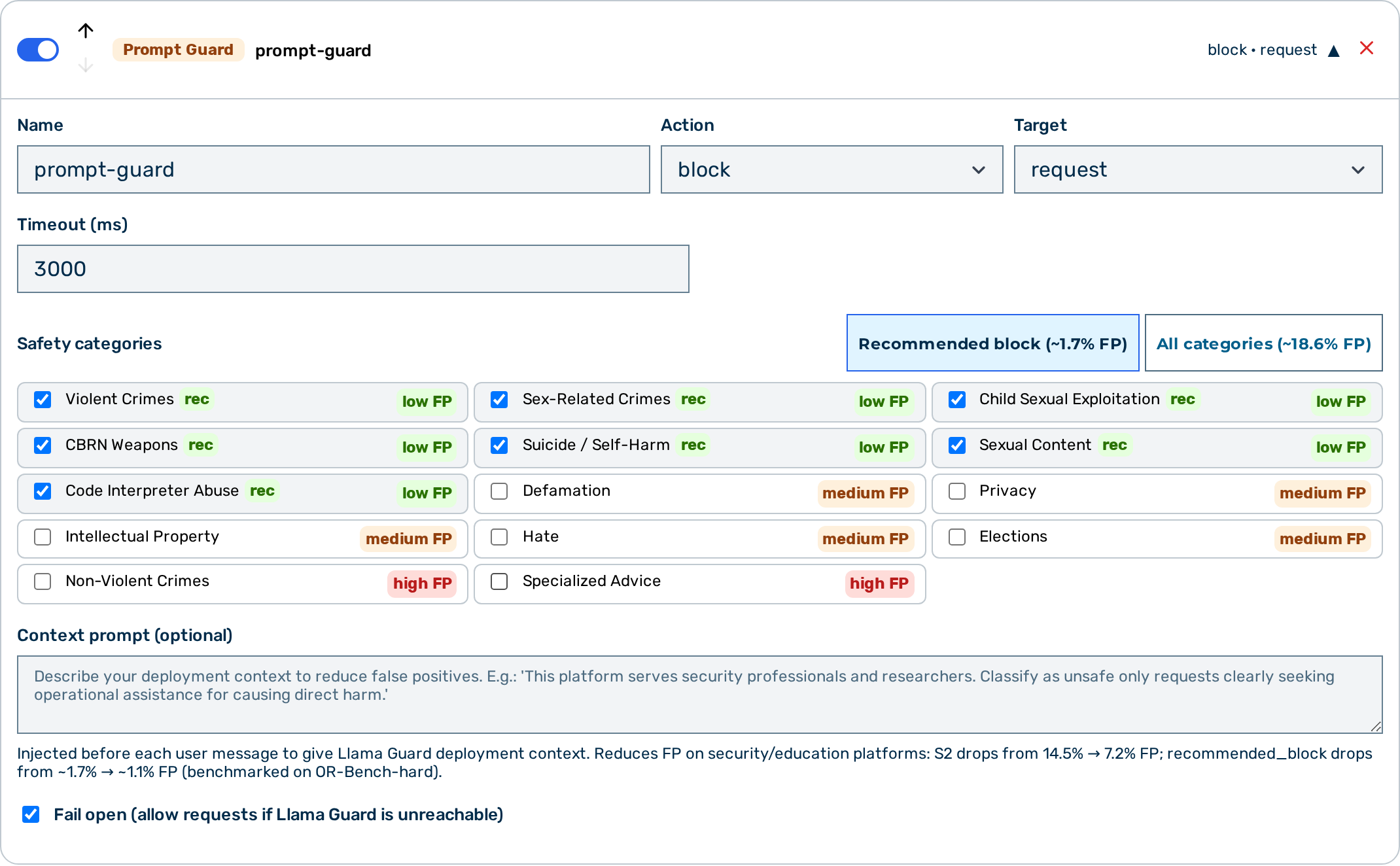 Prompt Guard editor
When to use Prompt Guard
Use Prompt Guard when you need semantic safety classification — detecting harmful intent expressed in natural language, rephrased attacks, or policy violations that literal keyword matching cannot catch. For structured data detection (PII, card numbers), use the Regex guardrail or NLP PII Detector.
How it works
The guardrail sends the inspected content to the locally hosted Llama Guard 3 sidecar. The model classifies the content against the configured safety categories and returns a verdict. Request-phase classification evaluates only the most recent user message — the full conversation history is not sent to the classifier.
⚠️ Caution: Prompt Guard does not support
action: "scrub". Configureblockorflagonly.
Configuration reference
| Field | Type | Default | Description |
|---|---|---|---|
type |
string | — | Must be "prompt_guard" |
name |
string | — | Human-readable label for this guardrail instance |
action |
string | "block" |
What to do on a safety violation: block or flag |
target |
string | "request" |
Which phase to classify: request, response, or both |
timeout_ms |
integer | 2000 |
Timeout for the sidecar call in milliseconds. Minimum 1000 ms, and a whole number — a value below that cannot complete a real call, so the detector becomes a guaranteed timeout and, on a fail_open detector, the request is forwarded unchecked. Values outside [1000, 120000], non-numeric values and an explicit null are rejected with 400; a value already stored on a detector is carried through unchanged. The runtime also clamps to [1000, 120000], so an out-of-range value that predates this rule is corrected rather than obeyed. |
fail_open |
boolean | true |
When true, sidecar errors allow the request to pass through; when false, they block it |
categories |
array | null | null |
Safety categories to enforce; null enforces all 14 categories |
context_prompt |
string | null |
Deployment context prepended to each user message before classification — reduces false positives on professional platforms (see Context injection) |
💡 Note: The classifier endpoint is platform-managed — the Llama Guard 3 sidecar is resolved by the platform, not per gateway. A detector may not carry a
urlfield: the gateway-config write endpoint rejects any guardrail detector that includes one (HTTP 400). This is a deliberate security boundary — a tenant-set endpoint would let a gateway be pointed at an arbitrary internal address.
Safety categories
| Code | Category | FP risk for block |
|---|---|---|
S1 |
Violent Crimes | Low |
S2 |
Non-Violent Crimes | High — 14.5% FP on security/education content; 7.2% with context_prompt |
S3 |
Sex-Related Crimes | Low |
S4 |
Child Sexual Exploitation | Low |
S5 |
Defamation | Medium |
S6 |
Specialised Advice (medical, legal, or financial) | High — triggers on any professional context |
S7 |
Privacy Violations | Medium |
S8 |
Intellectual Property Infringement | Medium |
S9 |
Weapons of Mass Destruction (CBRN) | Low |
S10 |
Hate Speech | Medium — triggers on academic and historical text |
S11 |
Suicide and Self-Harm | Low |
S12 |
Explicit Sexual Content | Low |
S13 |
Elections Integrity | Medium |
S14 |
Code Interpreter Abuse | Low — only fires in agentic/tool-use scenarios |
💡 Note: For
action: block, use only the low-FP categories:S1,S3,S4,S9,S11,S12,S14. This set produces approximately 1.7% false positives on OR-Bench-hard and drops to approximately 1.1% withcontext_prompton security and education platforms. AvoidS2andS6for blocking. Useaction: flagif you need visibility into S2, S6, or S10 without blocking.
Category filtering
When categories is set to an array, the guardrail only blocks or flags violations within the listed categories. Content classified as unsafe for a category not in the list is treated as safe.
When categories is null or omitted, all 14 categories are enforced.
Context injection
The context_prompt field lets you describe your deployment context so Llama Guard 3 can apply appropriate judgement. The text is prepended to each user message before classification.
This is most useful when your platform serves professionals who regularly ask questions that superficially resemble harmful requests:
{
  "type": "prompt_guard",
  "name": "safety-filter",
  "action": "block",
  "target": "request",
  "categories": ["S1", "S3", "S4", "S9", "S11", "S12", "S14"],
  "context_prompt": "This platform serves security professionals, educators, and researchers. Users regularly ask educational questions about cybersecurity, malware, vulnerabilities, chemistry, history, and other professional topics as part of legitimate work. Classify a request as unsafe only when it is clearly seeking operational assistance for causing direct harm — not when it is asking how something works, its history, or how to defend against it."
}
Measured impact (OR-Bench-hard, 10% sample):
| Configuration | Recommended_block FP | S2 alone FP |
|---|---|---|
| No context | ~1.7% | ~14.5% |
With context_prompt |
~1.1% | ~7.2% |
💡 Note: Before classification the gateway truncates the inspected text to its last 9,000 characters, keeping the most recent content and cutting any excess from the front. This bound is on characters, not tokens, and applies whether or not
context_promptis set. Llama Guard 3 has its own context window of roughly 4,096 tokens — that is a property of the model, not a gateway setting.
Actions
| Action | Behaviour |
|---|---|
block |
The request or response is denied. The caller receives a synthetic assistant message identifying which categories triggered the block. |
flag |
The violation is recorded in the request log. The pipeline continues without modification. |
💡 Note: When a request is blocked, the gateway returns a synthetic assistant message identifying the triggering categories. For example:
The value of the
namefield of the guardrail appears in the message, making it easy to correlate blocks with your guardrail configuration. When the classifier reported a violation without naming a category, the reason readsuncategorized; the classifier's own wording is written to the gateway error log rather than returned to the caller.
Classifier output validation
The gateway does not trust the classifier's answer. Llama Guard 3 must reply with one of exactly two shapes:
| Completion | Meaning |
|---|---|
safe |
No violation. Surrounding whitespace and trailing ASCII punctuation are tolerated; any further word or non-ASCII text after the verdict is not. |
unsafe followed by a category list |
A violation. Categories are S<n> codes separated by commas, whitespace, newlines, or a colon — for example unsafe\nS1,S9. |
Anything else — an empty completion, a repetition loop, prose, JSON, a foreign alphabet, a truncated verdict word — is indeterminate: neither safe nor unsafe. An indeterminate result is treated exactly like a classifier outage (see fail_open below), never as a pass. It is recorded as guardrail_verdict: indeterminate in the request log, raises a [guardrail_indeterminate] entry in the gateway error log, and feeds the guardrail_unavailable platform alert, so a broken classifier is visible within minutes instead of silently passing traffic.
Two related rules:
- An
unsafeverdict is never downgraded. If the classifier saysunsafebut its category list is malformed or truncated, the detection still stands — the gateway enforces whichever validS<n>codes it can read. - An
unsafeverdict the classifier did not attribute to any category blocks (or flags) with the reasonuncategorizedwhen nocategoriesallowlist is configured. When an allowlist is configured, the result is indeterminate instead: the gateway cannot tell whether the violation is one you asked it to enforce, so it will not guess in either direction.
💡 Note: Only category codes that stand alone as a complete token are recognised. A classifier that writes prose containing something like
abschnitt s5does not thereby report categoryS5.
fail_open behaviour
fail_open governs what happens when the guardrail cannot produce a verdict — whether because the sidecar was unreachable, or because it replied with output the gateway could not read.
fail_open |
Sidecar unavailable or classifier output unreadable |
|---|---|
true (default) |
Request passes through as if no violation was found. The event is still logged as guardrail_verdict: error (unreachable) or indeterminate (unreadable) and raises a platform alert. |
false |
Request is blocked with the "temporarily unavailable" message |
⚠️ Caution: Set
fail_open: falsein environments where safety enforcement must never be bypassed. Withfail_open: true, a sidecar outage — or a classifier replica returning nonsense behind HTTP 200 — allows all traffic through unclassified. The gateway will tell you loudly that this is happening, but it will not stop the traffic.💡 Note: Verdicts recorded on an internal inference leg (for example an agentic sub-fetch or a summarisation step) that is itself blocked are not carried onto the parent request's log row, so a leg-level
indeterminateappears in the gateway error log and the model-error triage queue rather than inrequest_log.
Limitations
scrubaction is not supported. Configureblockorflagonly.- Request-phase classification evaluates only the last user message. The full conversation history is not sent to the classifier.
- Before classification the gateway truncates the inspected text to its last 9,000 characters (the most recent content is kept). This is a character bound, independent of token count and of whether
context_promptis set. Llama Guard 3's own context window of roughly 4,096 tokens is a separate model limit. - Only the classifier's documented output shapes are accepted; anything else is an indeterminate result governed by
fail_open(see Classifier output validation). Pointing the guardrail at a model that does not follow the Llama Guard 3 output contract therefore makes every request indeterminate. - Llama Guard 3 classifies text. A turn whose content carries only images, audio, documents, or tool results contains nothing for it to read. On the request phase the guardrail then falls back to the most recent user message that does carry text; if there is none, the request proceeds entirely unclassified — including any earlier turns the model still sees. A malformed content shape is different: content the gateway cannot interpret at all (a content array of scalars, a
textblock whosetextis not a string) is an indeterminate result governed byfail_open, not a silent pass. - Prompt Guard is optimised for unstructured content policy enforcement. For structured sensitive data (PII, card numbers, credentials), use the Regex guardrail or the NLP PII Detector.
Example configurations
Block violent, extremist, and harmful content (recommended low-FP set)
{
  "type": "prompt_guard",
  "name": "safety-filter",
  "action": "block",
  "target": "both",
  "categories": ["S1", "S3", "S4", "S9", "S11", "S12", "S14"]
}
Block with deployment context to reduce false positives
{
  "type": "prompt_guard",
  "name": "safety-filter",
  "action": "block",
  "target": "request",
  "categories": ["S1", "S3", "S4", "S9", "S11", "S12", "S14"],
  "context_prompt": "This platform serves security professionals and researchers. Classify as unsafe only requests clearly seeking operational assistance for causing direct harm."
}
Flag specialised advice in responses for audit (no blocking)
{
  "type": "prompt_guard",
  "name": "flag-advice",
  "action": "flag",
  "target": "response",
  "categories": ["S6"]
}
Enforce all 14 categories on requests, blocking on sidecar failure
{
  "type": "prompt_guard",
  "name": "full-safety",
  "action": "block",
  "target": "request",
  "fail_open": false
}
Layer Prompt Guard after keyword pre-filtering
Running keyword guardrails first (Tier 1) catches simple jailbreak strings before the more expensive sidecar call of Prompt Guard.
[
  {
    "type": "keyword",
    "name": "jailbreak-terms",
    "action": "block",
    "target": "request",
    "keywords": ["ignore previous instructions", "DAN mode", "jailbreak"],
    "case_sensitive": false
  },
  {
    "type": "prompt_guard",
    "name": "safety-filter",
    "action": "block",
    "target": "both",
    "categories": ["S1", "S3", "S4", "S9", "S11", "S12", "S14"]
  }
]
Configuring Prompt Guard
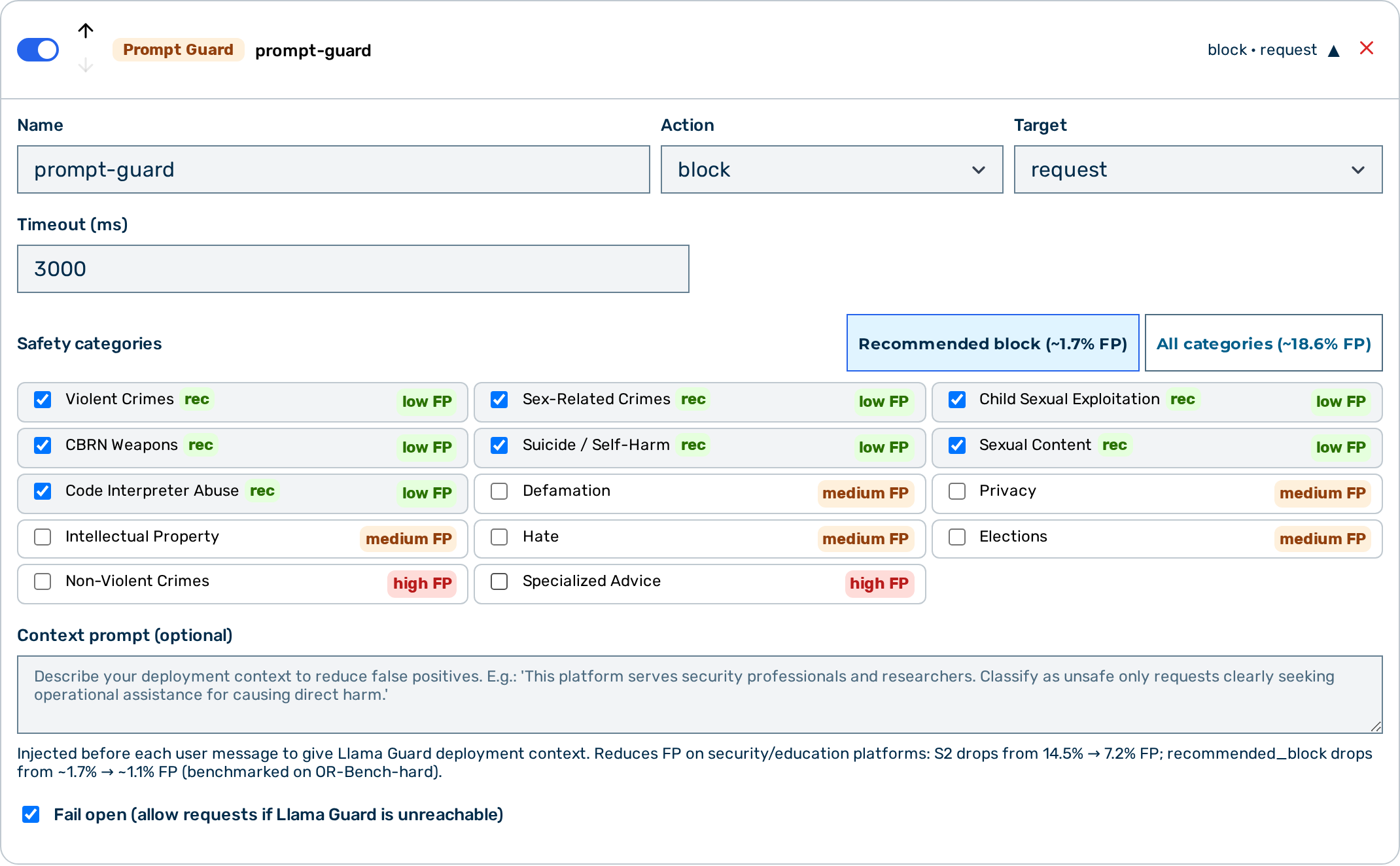 Prompt Guard card — expanded view
Proceed as follows to configure Prompt Guard in the Guardrail Builder:
- Open the gateway detail page and scroll down to the Guardrails card.
- Click on the + Prompt Guard button.
- A collapsed Prompt Guard card appears at the bottom of the list.
- Click on the card to expand it.
- Enter a name in the Name text field.
- Select the action from the Action drop-down list:
blockorflag. - The drop-down also lists scrub, but Prompt Guard does not support it —
scrubis treated asflag. - Select the target from the Target drop-down list:
request,response, orboth. - If required, select specific safety categories from the Safety categories list. Leave empty to enforce all 14 categories.
- If required, enter a deployment context in the Context Prompt text field to reduce false positives.
- Toggle the Fail Open switch to
falseif the sidecar must be a hard dependency. - Click on the Save Guardrails button.
-> Prompt Guard is saved and appears in the execution plan.
Pipeline position
Prompt Guard is Tier 2 — it makes an HTTP call to a sidecar service. All Tier 1 guardrails (regex, keyword) run before any Tier 2 guardrail. Within Tier 2, guardrails run in the order they appear in the guardrails array.
See also
- Guardrail pipeline overview
- Keyword guardrail — fast exact-string blocking, useful as a Tier 1 pre-filter
- NLP PII detector — NLP-based PII detection