Provider key management (BYOK)
Bring Your Own Key (BYOK) lets you store provider API keys encrypted inside the gateway rather than embedding them in configuration files. The gateway encrypts each key at rest and decrypts it on demand when forwarding upstream requests.
Key storage and encryption
Provider API keys are stored encrypted in the gateway database using AES-256-CBC plus HMAC-SHA256 for integrity. The encryption passphrase is held outside the database, configured by Myra for your deployment. A stored key value is never returned to the SPA; the list endpoint returns only the alias and metadata.
Key identity model
Each stored key is uniquely identified by the combination of:
gateway_id— the gateway the key is bound to (ortenant_idwhen stored at tenant level).provider— the provider identifier (for exampleopenai,anthropic,bedrock).alias— a label for the key. The default value isdefault.
Tenant-level keys serve administrative and usage-synchronisation tasks (for example the Anthropic Admin API usage feed); they are not consulted on the inference path. Inference always uses the key stored on the gateway itself for the requested provider — there is no fall-through from a gateway to a tenant-level key. See Tenants and gateways API.
Multiple keys per provider
Multiple keys for the same provider on the same gateway coexist under different aliases. The mechanism supports zero-downtime rotation and per-flow key selection.
To select a non-default alias on a specific inference request, send the x-aig-byok-alias header:
curl "https://<your-gateway-host>/v1/<TENANT>/<GATEWAY>/openai/chat/completions" \
  -H "Authorization: Bearer <TOKEN>" \
  -H "x-aig-byok-alias: backup" \
  -H "Content-Type: application/json" \
  -d '{"model": "gpt-4o", "messages": [{"role":"user","content":"Hi"}]}'
💡 Note: The alias must match a key stored for the resolved provider on the gateway. When the specified alias does not exist, the request is rejected with a configuration error — the gateway does not silently fall back to the
defaultalias (that would spend a different key than the one you requested). An emptyx-aig-byok-aliasheader is treated the same as sending no header (thedefaultalias).
Per-provider key formats
Most providers accept the API key as a single string. Three providers expect a structured value in the API Key field:
- AWS Bedrock — colon-delimited credentials. See AWS Bedrock.
- Vertex AI — a Google Cloud service-account JSON key. The gateway signs a JWT with the service account's private key and exchanges it for a short-lived OAuth2 access token (RFC 7523 JWT-bearer). See Google Vertex AI.
For every other provider, paste the provider's API key string as-is.
Adding a BYOK key
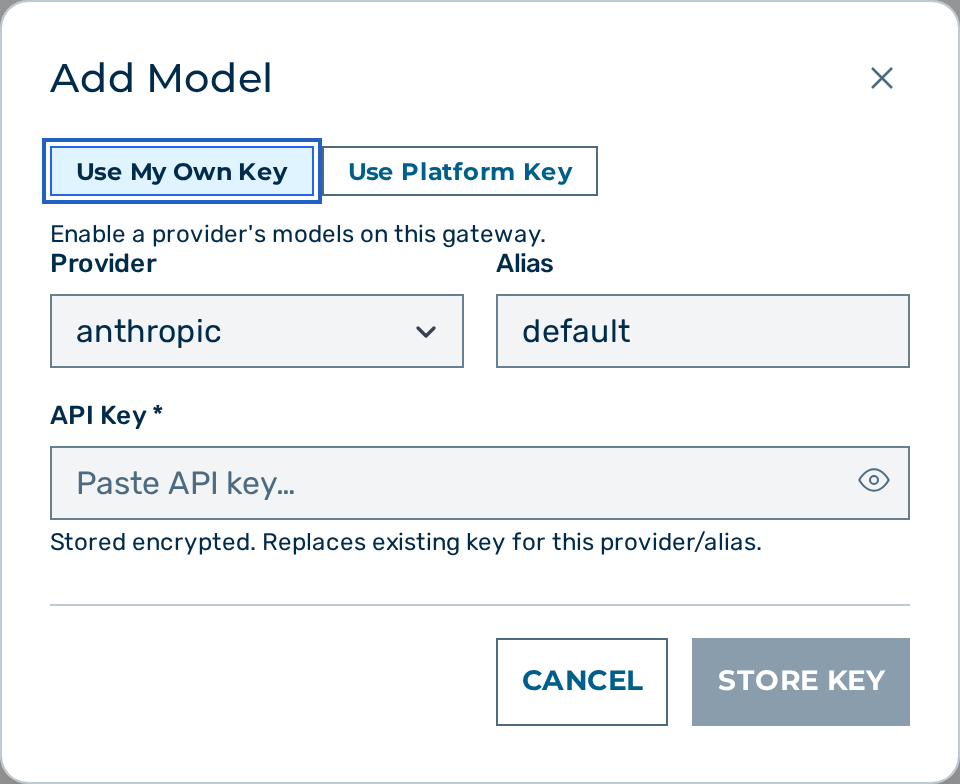
Proceed as follows to add a BYOK key:
- Open Settings → Gateways. (A separate Settings → Providers page, admin-only, also holds provider key + status config.)
- Click on the Open → button of the gateway.
- The gateway detail view opens.
- Locate the Provider Keys card.
- Click on the + Add Model button.
- The Add Model dialog opens.
- Select the provider in the Provider drop-down list. The list is populated from
GET /admin/v1/providers. - Enter the alias in the Alias text field. Leave the value as
defaultfor the primary key. - Paste the API key in the API Key field. For providers that do not require a key, the field is hidden and a hint reads This provider does not require an API key.
- Click on the Store Key button.
-> The key is stored encrypted, the dialog displays Key stored and encrypted successfully., and the new alias appears in the Provider Keys card.
💡 Note: Posting again with the same
(provider, alias)rotates the stored value. The previous value is replaced.
Deleting a BYOK key
Proceed as follows to delete a BYOK key:
- Open the Gateways view and the gateway detail view.
- Locate the Provider Keys card.
- Click on the Delete button next to the key.
-> The key is removed immediately. Subsequent requests that resolve to the deleted (provider, alias) fail until a replacement key is stored. The gateway does not auto-substitute another alias, and there is no tenant-level fallback on the inference path — to use a different key, request its alias explicitly with the x-aig-byok-alias header.
⚠️ Caution: Deleting the
defaultkey for a provider causes every request that does not specify an explicit alias to fail until a replacement key is stored.
Storing keys via the API
Both gateway-scoped and tenant-scoped key storage is available via the admin API. See Tenants and gateways API for the endpoints and request bodies.
See also
- BYOK — what BYOK is and why
- Provider authentication
- Gateways
- Fallback and retry
- Providers overview